幻灯片广告增加拖拽功能;更新CKEditor至4.11.4版本
This commit is contained in:
 comm5v8
File diff suppressed because it is too large
Load Diff
+294
-291
File diff suppressed because one or more lines are too long
@@ -3,7 +3,7 @@
|
||||
For licensing, see LICENSE.md or https://ckeditor.com/legal/ckeditor-oss-license
|
||||
*/
|
||||
CKEDITOR.plugins.setLang("a11yhelp","pt",{title:"Instruções de acessibilidade",contents:"Conteúdo de ajuda. Use a tecla ESC para fechar esta janela.",legend:[{name:"Geral",items:[{name:"Barra de ferramentas do editor",legend:"Clique em ${toolbarFocus} para navegar na barra de ferramentas. Para navegar entre o grupo da barra de ferramentas anterior e seguinte use TAB e SHIFT+TAB. Para navegar entre o botão da barra de ferramentas seguinte e anterior use a SETA DIREITA ou SETA ESQUERDA. Carregue em ESPAÇO ou ENTER para ativar o botão da barra de ferramentas."},
|
||||
{name:"Janela do editor",legend:"Inside a dialog, press TAB to navigate to the next dialog element, press SHIFT+TAB to move to the previous dialog element, press ENTER to submit the dialog, press ESC to cancel the dialog. When a dialog has multiple tabs, the tab list can be reached either with ALT+F10 or with TAB as part of the dialog tabbing order. With tab list focused, move to the next and previous tab with RIGHT and LEFT ARROW, respectively."},{name:"Menu de contexto do editor",legend:"Clique em ${contextMenu} ou TECLA APLICAÇÃO para abrir o menu de contexto. Depois vá para a opção do menu seguinte com TAB ou SETA PARA BAIXO. Vá para a opção anterior com SHIFT+TAB ou SETA PARA CIMA. Pressione ESPAÇO ou ENTER para selecionar a opção do menu. Abra o submenu da opção atual com ESPAÇO, ENTER ou SETA DIREITA. Vá para o item do menu contentor com ESC ou SETA ESQUERDA. Feche o menu de contexto com ESC."},
|
||||
{name:"Janela do editor",legend:"Dentro de uma janela de diálogo, use TAB para navegar para o campo seguinte; use SHIFT + TAB para mover para o campo anterior, use ENTER para submeter a janela, use ESC para cancelar a janela. Para as janelas que tenham vários separadores, use ALT + F10 para navegar na lista de separadores. Na lista pode mover entre o separador seguinte ou anterior com SETA DIREITA e SETA ESQUERDA, respetivamente"},{name:"Menu de contexto do editor",legend:"Clique em ${contextMenu} ou TECLA APLICAÇÃO para abrir o menu de contexto. Depois vá para a opção do menu seguinte com TAB ou SETA PARA BAIXO. Vá para a opção anterior com SHIFT+TAB ou SETA PARA CIMA. Pressione ESPAÇO ou ENTER para selecionar a opção do menu. Abra o submenu da opção atual com ESPAÇO, ENTER ou SETA DIREITA. Vá para o item do menu contentor com ESC ou SETA ESQUERDA. Feche o menu de contexto com ESC."},
|
||||
{name:"Editor de caixa em lista",legend:"Dentro de uma lista, para navegar para o item seguinte da lista use TAB ou SETA PARA BAIXO. Para o item anterior da lista use SHIFT+TAB ou SETA PARA BAIXO. Carregue em ESPAÇO ou ENTER para selecionar a opção lista. Carregue em ESC para fechar a caixa da lista."},{name:"Editor da barra de caminho dos elementos",legend:"Clique em ${elementsPathFocus} para navegar na barra de caminho dos elementos. Para o botão do elemento seguinte use TAB ou SETA DIREITA. para o botão anterior use SHIFT+TAB ou SETA ESQUERDA. Carregue em ESPAÇO ou ENTER para selecionar o elemento no editor."}]},
|
||||
{name:"Comandos",items:[{name:"Comando de anular",legend:"Carregar ${undo}"},{name:"Comando de refazer",legend:"Clique ${redo}"},{name:"Comando de negrito",legend:"Pressione ${bold}"},{name:"Comando de itálico",legend:"Pressione ${italic}"},{name:"Comando de sublinhado",legend:"Pressione ${underline}"},{name:"Comando de hiperligação",legend:"Pressione ${link}"},{name:"Comando de ocultar barra de ferramentas",legend:"Pressione ${toolbarCollapse}"},{name:"Aceder ao comando espaço de foco anterior",
|
||||
legend:"Clique em ${accessPreviousSpace} para aceder ao espaço do focos inalcançável mais perto antes do sinal de omissão, por exemplo: dois elementos HR adjacentes. Repetir a combinação da chave para alcançar os espaços dos focos distantes."},{name:"Acesso comando do espaço focus seguinte",legend:"Pressione ${accessNextSpace} para aceder ao espaço do focos inalcançável mais perto depois do sinal de omissão, por exemplo: dois elementos HR adjacentes. Repetir a combinação da chave para alcançar os espaços dos focos distantes."},
|
||||
|
||||
@@ -2,10 +2,11 @@
|
||||
Copyright (c) 2003-2019, CKSource - Frederico Knabben. All rights reserved.
|
||||
For licensing, see LICENSE.md or https://ckeditor.com/legal/ckeditor-oss-license
|
||||
*/
|
||||
CKEDITOR.plugins.setLang("a11yhelp","sr-latn",{title:"Accessibility Instructions",contents:"Help Contents. To close this dialog press ESC.",legend:[{name:"Opšte",items:[{name:"Editor Toolbar",legend:"Press ${toolbarFocus} to navigate to the toolbar. Move to the next and previous toolbar group with TAB and SHIFT+TAB. Move to the next and previous toolbar button with RIGHT ARROW or LEFT ARROW. Press SPACE or ENTER to activate the toolbar button."},{name:"Editor Dialog",legend:"Inside a dialog, press TAB to navigate to the next dialog element, press SHIFT+TAB to move to the previous dialog element, press ENTER to submit the dialog, press ESC to cancel the dialog. When a dialog has multiple tabs, the tab list can be reached either with ALT+F10 or with TAB as part of the dialog tabbing order. With tab list focused, move to the next and previous tab with RIGHT and LEFT ARROW, respectively."},
|
||||
{name:"Editor Context Menu",legend:"Press ${contextMenu} or APPLICATION KEY to open context-menu. Then move to next menu option with TAB or DOWN ARROW. Move to previous option with SHIFT+TAB or UP ARROW. Press SPACE or ENTER to select the menu option. Open sub-menu of current option with SPACE or ENTER or RIGHT ARROW. Go back to parent menu item with ESC or LEFT ARROW. Close context menu with ESC."},{name:"Editor List Box",legend:"Inside a list-box, move to next list item with TAB OR DOWN ARROW. Move to previous list item with SHIFT+TAB or UP ARROW. Press SPACE or ENTER to select the list option. Press ESC to close the list-box."},
|
||||
{name:"Editor Element Path Bar",legend:"Press ${elementsPathFocus} to navigate to the elements path bar. Move to next element button with TAB or RIGHT ARROW. Move to previous button with SHIFT+TAB or LEFT ARROW. Press SPACE or ENTER to select the element in editor."}]},{name:"Commands",items:[{name:" Undo command",legend:"Press ${undo}"},{name:" Redo command",legend:"Press ${redo}"},{name:" Bold command",legend:"Press ${bold}"},{name:" Italic command",legend:"Press ${italic}"},{name:" Underline command",
|
||||
legend:"Press ${underline}"},{name:" Link command",legend:"Press ${link}"},{name:" Toolbar Collapse command",legend:"Press ${toolbarCollapse}"},{name:" Access previous focus space command",legend:"Press ${accessPreviousSpace} to access the closest unreachable focus space before the caret, for example: two adjacent HR elements. Repeat the key combination to reach distant focus spaces."},{name:" Access next focus space command",legend:"Press ${accessNextSpace} to access the closest unreachable focus space after the caret, for example: two adjacent HR elements. Repeat the key combination to reach distant focus spaces."},
|
||||
{name:" Accessibility Help",legend:"Press ${a11yHelp}"},{name:" Paste as plain text",legend:"Press ${pastetext}",legendEdge:"Press ${pastetext}, followed by ${paste}"}]}],tab:"Tab",pause:"Pause",capslock:"Caps Lock",escape:"Escape",pageUp:"Page Up",pageDown:"Page Down",leftArrow:"Left Arrow",upArrow:"Up Arrow",rightArrow:"Right Arrow",downArrow:"Down Arrow",insert:"Insert",leftWindowKey:"Left Windows key",rightWindowKey:"Right Windows key",selectKey:"Select key",numpad0:"Numpad 0",numpad1:"Numpad 1",
|
||||
numpad2:"Numpad 2",numpad3:"Numpad 3",numpad4:"Numpad 4",numpad5:"Numpad 5",numpad6:"Numpad 6",numpad7:"Numpad 7",numpad8:"Numpad 8",numpad9:"Numpad 9",multiply:"Multiply",add:"Add",subtract:"Subtract",decimalPoint:"Decimal Point",divide:"Divide",f1:"F1",f2:"F2",f3:"F3",f4:"F4",f5:"F5",f6:"F6",f7:"F7",f8:"F8",f9:"F9",f10:"F10",f11:"F11",f12:"F12",numLock:"Num Lock",scrollLock:"Scroll Lock",semiColon:"Semicolon",equalSign:"Equal Sign",comma:"Comma",dash:"Dash",period:"Period",forwardSlash:"Forward Slash",
|
||||
graveAccent:"Grave Accent",openBracket:"Open Bracket",backSlash:"Backslash",closeBracket:"Close Bracket",singleQuote:"Single Quote"});
|
||||
CKEDITOR.plugins.setLang("a11yhelp","sr-latn",{title:"Uputstva za pomoć",contents:"Sadržaji za pomoć. Da bi ste zatvorili diјalog pritisnite ESC.",legend:[{name:"Opšte",items:[{name:"Alatke za uređivanje",legend:"Pritisnite ${toolbarFocus} da bi označili alatke. Do sledeće i prethodne grupe alatki možete doći sa tasterom TAB i SHIFT+TAB. Do tastera sledeće i predthodne grupe alatki možete doći sa tasterima STRELICA LEVO i STRELICA DESNO. Pritisnite SPACE ili ENTER da bi aktivirali taster alatki."},
|
||||
{name:"Uređivač dijaloga",legend:"U prozoru dijalog pritisnite TAB da bi došli do sledećeg polja dijaloga, pritisnite ENTER za prihvatanje dijaloga, pritisnite ESC za odbijanje dijaloga. Kada dijalog ima više kartica, do njih možete doći pritiskom na ALT + F10 ili TAB. Zatim sa TAB ili STRELICA DESNO dolazite do naredne kartice."},{name:"Uređivač lokalnog menija",legend:"Pritisnite ${contextMenu} ili APPLICATION TASTER za otvaranje lokalnog menija. Zatim sa TAB ili STRELICA DOLE možete preći na sledeću tačku menija. Prethodnu opciju možete postići sa SHIFT+TAB ili STRELICA GORE. Pritisnite SPACE ili ENTER za odabir tačke menija. Pritisnite SPACE ili ENTER da bi ste otvorili podmeni trenutne stavke menija. Za povratak u glavni meni pritisnite ESC ili STRELICA DESNO. Zatvorite lokalni meni pomoću tastera ESC."},
|
||||
{name:"Uređjivač liste",legend:"Do sledećеg elementa liste možete doći sa TAB ili STERLICA DOLE. Za odabir prethodnog elementa pritisnite SHIFT+TAB ili STREKICA DOLE. Za odabir elementa pritisnite SPACE ili ENTER. Sa pritiskom ESC zatvarate listu. "},{name:"Uredjivač trake puta elemenata",legend:"Pritisnite $ {elementsPathFocus} da bi ste označili traku puta elenementa. Do sledećеg elementa možete doći sa TAB ili STRELICA DESNO. Do prethodnоg dolazite sa SHIFT+TAB ili STRELICA DESNO. Sa SPACE ili ENTER možete odbrati element u uredjivaču."}]},
|
||||
{name:"Komanda",items:[{name:"Otkaži komandu",legend:"Pritisni ${undo}"},{name:"Prepoznavanje komande",legend:"Pritisni ${redo}"},{name:"Podebljana komanda",legend:"Pritisni ${bold}"},{name:"Kurziv komanda",legend:"Pritisni ${italic}"},{name:"Precrtana komanda",legend:"Pritisni ${underline}"},{name:"Link komanda",legend:"Pritisni ${link}"},{name:"Zatvori traku uredjivača komanda ",legend:"Pritisni ${toolbarCollapse}"},{name:"Pristup prethodnom fokus mestu komanda ",legend:"Pritisni ${accessNextSpace} da bi pristupio najbližem nedostupnom fokus mestu pre znaka hiányjel, na primer: dva susedna HR elementa.Ponovi kombinaciju tastera da pronadješ fokus mesto koje se nalazi dalje."},
|
||||
{name:"Pristup sledećem fokus mestu komanda ",legend:"Pritisni ${accessNextSpace} da bi pristupio najbližem nedostupnom fokus mestu posle znaka hiányjel, na primer: dva susedna HR elementa.Ponovi kombinaciju tastera da pronadješ fokus mesto koje se nalazi dalje."},{name:"Pomoć pristupačnosti",legend:"Pritisni ${a11yHelp}"},{name:"Nalepi kao običan tekst",legend:"Pritisnite: ${pastetext}",legendEdge:"Pritisnite ${pastetext}-t, zatim ${paste}-t"}]}],tab:"Tab",pause:"Pause",capslock:"Caps Lock",escape:"Escape",
|
||||
pageUp:"Page Up",pageDown:"Page Down",leftArrow:"Strelica levo",upArrow:"strelica gore",rightArrow:"strelica desno",downArrow:"strelica dole",insert:"Insert",leftWindowKey:"levi Windows-taster",rightWindowKey:"desni Windows-taster",selectKey:"Odabir tastera",numpad0:"Tasteri sa brojevima 0",numpad1:"Tasteri sa brojevima 1",numpad2:"Tasteri sa brojevima 2",numpad3:"Tasteri sa brojevima 3",numpad4:"Tasteri sa brojevima 4",numpad5:"Tasteri sa brojevima 5",numpad6:"Tasteri sa brojevima 6",numpad7:"Tasteri sa brojevima 7",
|
||||
numpad8:"Tasteri sa brojevima 8",numpad9:"Tasteri sa brojevima 9",multiply:"Množenje",add:"Sabiranje",subtract:"Oduzimanje",decimalPoint:"Decimalna tačka",divide:"Deljenjje",f1:"F1",f2:"F2",f3:"F3",f4:"F4",f5:"F5",f6:"F6",f7:"F7",f8:"F8",f9:"F9",f10:"F10",f11:"F11",f12:"F12",numLock:"Num Lock",scrollLock:"Scroll Lock",semiColon:"Tačka zarez",equalSign:"Znak jednakosti",comma:"Zarez",dash:"Crtica",period:"Tačka",forwardSlash:"Kosa crta",graveAccent:"Obrnuti znak akcenta",openBracket:"Otvorena čoškasta zagrada",
|
||||
backSlash:"Obrnuta kosa crta",closeBracket:"Zatvorena ćoškasta zagrada",singleQuote:"Simpli znak navoda"});
|
||||
@@ -2,10 +2,11 @@
|
||||
Copyright (c) 2003-2019, CKSource - Frederico Knabben. All rights reserved.
|
||||
For licensing, see LICENSE.md or https://ckeditor.com/legal/ckeditor-oss-license
|
||||
*/
|
||||
CKEDITOR.plugins.setLang("a11yhelp","sr",{title:"Accessibility Instructions",contents:"Help Contents. To close this dialog press ESC.",legend:[{name:"Опште",items:[{name:"Editor Toolbar",legend:"Press ${toolbarFocus} to navigate to the toolbar. Move to the next and previous toolbar group with TAB and SHIFT+TAB. Move to the next and previous toolbar button with RIGHT ARROW or LEFT ARROW. Press SPACE or ENTER to activate the toolbar button."},{name:"Editor Dialog",legend:"Inside a dialog, press TAB to navigate to the next dialog element, press SHIFT+TAB to move to the previous dialog element, press ENTER to submit the dialog, press ESC to cancel the dialog. When a dialog has multiple tabs, the tab list can be reached either with ALT+F10 or with TAB as part of the dialog tabbing order. With tab list focused, move to the next and previous tab with RIGHT and LEFT ARROW, respectively."},
|
||||
{name:"Editor Context Menu",legend:"Press ${contextMenu} or APPLICATION KEY to open context-menu. Then move to next menu option with TAB or DOWN ARROW. Move to previous option with SHIFT+TAB or UP ARROW. Press SPACE or ENTER to select the menu option. Open sub-menu of current option with SPACE or ENTER or RIGHT ARROW. Go back to parent menu item with ESC or LEFT ARROW. Close context menu with ESC."},{name:"Editor List Box",legend:"Inside a list-box, move to next list item with TAB OR DOWN ARROW. Move to previous list item with SHIFT+TAB or UP ARROW. Press SPACE or ENTER to select the list option. Press ESC to close the list-box."},
|
||||
{name:"Editor Element Path Bar",legend:"Press ${elementsPathFocus} to navigate to the elements path bar. Move to next element button with TAB or RIGHT ARROW. Move to previous button with SHIFT+TAB or LEFT ARROW. Press SPACE or ENTER to select the element in editor."}]},{name:"Commands",items:[{name:" Undo command",legend:"Press ${undo}"},{name:" Redo command",legend:"Press ${redo}"},{name:" Bold command",legend:"Press ${bold}"},{name:" Italic command",legend:"Press ${italic}"},{name:" Underline command",
|
||||
legend:"Press ${underline}"},{name:" Link command",legend:"Press ${link}"},{name:" Toolbar Collapse command",legend:"Press ${toolbarCollapse}"},{name:" Access previous focus space command",legend:"Press ${accessPreviousSpace} to access the closest unreachable focus space before the caret, for example: two adjacent HR elements. Repeat the key combination to reach distant focus spaces."},{name:" Access next focus space command",legend:"Press ${accessNextSpace} to access the closest unreachable focus space after the caret, for example: two adjacent HR elements. Repeat the key combination to reach distant focus spaces."},
|
||||
{name:" Accessibility Help",legend:"Press ${a11yHelp}"},{name:" Paste as plain text",legend:"Press ${pastetext}",legendEdge:"Press ${pastetext}, followed by ${paste}"}]}],tab:"Tab",pause:"Pause",capslock:"Caps Lock",escape:"Escape",pageUp:"Page Up",pageDown:"Page Down",leftArrow:"Left Arrow",upArrow:"Up Arrow",rightArrow:"Right Arrow",downArrow:"Down Arrow",insert:"Insert",leftWindowKey:"Left Windows key",rightWindowKey:"Right Windows key",selectKey:"Select key",numpad0:"Numpad 0",numpad1:"Numpad 1",
|
||||
numpad2:"Numpad 2",numpad3:"Numpad 3",numpad4:"Numpad 4",numpad5:"Numpad 5",numpad6:"Numpad 6",numpad7:"Numpad 7",numpad8:"Numpad 8",numpad9:"Numpad 9",multiply:"Multiply",add:"Add",subtract:"Subtract",decimalPoint:"Decimal Point",divide:"Divide",f1:"F1",f2:"F2",f3:"F3",f4:"F4",f5:"F5",f6:"F6",f7:"F7",f8:"F8",f9:"F9",f10:"F10",f11:"F11",f12:"F12",numLock:"Num Lock",scrollLock:"Scroll Lock",semiColon:"Semicolon",equalSign:"Equal Sign",comma:"Comma",dash:"Dash",period:"Period",forwardSlash:"Forward Slash",
|
||||
graveAccent:"Grave Accent",openBracket:"Open Bracket",backSlash:"Backslash",closeBracket:"Close Bracket",singleQuote:"Single Quote"});
|
||||
CKEDITOR.plugins.setLang("a11yhelp","sr",{title:"Упутства за помоћ",contents:"Садржаји за помоћ. Да би сте затворили дијалог притисните ЕСЦ",legend:[{name:"Опште",items:[{name:"Алатке за преуређиванје",legend:"Притисните ${toolbarFocus} да би означили алатке. До следеће и претходне групе алатки можете дићи тастером TAB и SHIFT+TAB. До тастера следеће и претходне групе алатки можете доћи са тастерима СТРЕЛИЦА ЛЕВО и СТРЕЛИЦА ДЕСНО. Притисните СПАЦЕ и ЕНТЕР да би активирали тастер алатки."},{name:"Уређивач дијалога",
|
||||
legend:"У прозору дијалог притисните ТАБ да би дошли до следећег поља дијалога, притисните ЕНТЕР за прихватање дијалога, притисните ЕСЦ за одбијање дијалога. Када дијалог има више картица, до њих можете доћи притиском на АЛТ+Ф10 или ТАБ. Затим са ТАБ или СТРЕЛИЦА ДЕСНО долазите до наредне картице."},{name:"Уређивач локалног менија.",legend:"Притисните ${contextMenu} или APPLICATION ТАСТЕР за отварање локалног менија. Затим са ТАБ или СТРЕЛИЦА ДОЛЕ можете прећи на следећу зачку менија. Претходну опцију можете постићи са ШХИФТ+ТАБ или СТРЕЛИЦА ГОРЕ. Притисните СПАЦЕ или ЕНТЕР за одабир тачке менија. Притисните СПАЦЕ или ЕНТЕР да би се отворио подмени тренутне ставке менија. За повратак у главни мени притисмите ЕСЦ или СТРЕЛИЦА ДЕСНО. Затворите локални мени помоћу тастера ЕСЦ."},
|
||||
{name:"Уређивач листе",legend:"До следећег елемента листе можете дочи са ТАБ или СТРЕЛИЦА ДОЛЕ. За одабир петходног елемента притисните СХИФТ+TAБ или СТРЕЛИЦА ДОЛЕ. За одабир елемента притисните СПАЦЕ или ЕНТЕР. Са притиско ЕСЦ затварате листу. "},{name:"Уређивач траке пута елемената",legend:"Притисни ${elementsPathFocus} да би означили траку пута елемената. До следећег елемента можете доћи са TAБ или СТРЕЛИЦА ДЕСНО. До претходног долазите са СХИФТ+TAБ или СТРЕЛИЦА ДЕСНО. Са СПАЦЕ или ЕНТЕР можете одабрати елемент у уређивачу."}]},
|
||||
{name:"Команда",items:[{name:"Откажи команду",legend:"Притисни ${undo}"},{name:"Понови команду",legend:"Притисни ${redo}"},{name:"Подебљана команда",legend:"Притисни ${bold}"},{name:"Курзив команда",legend:"Притисни ${italic}"},{name:"Прецтрана команда",legend:"Притисни ${underline}"},{name:"Линк команда",legend:"Притисни ${link}"},{name:"Затвори траку уређивача команда",legend:"Притисни ${toolbarCollapse}"},{name:"Приступ претходном фокус месту команда",legend:"Притисни ${accessNextSpace} да би приступио најближем недоступном фокус месту пре знака hiányjel, на пример: дав сусаедна ХР елемента. Понови комбинацију тастера да пронађеш фокус место које се налази даље."},
|
||||
{name:"Приступ следећем фокус месту команда ",legend:"Притисни ${accessNextSpace} да би приступио најближем недоступном фокус месту после знака hiányjel, на пример: дав сусаедна ХР елемента. Понови комбинацију тастера да пронађеш фокус место које се налази даље."},{name:"Помоћ приступачнсти",legend:"Притисни ${a11yHelp}"},{name:" Налепи као обичан текст",legend:"Притисните: ${pastetext}",legendEdge:"Притисните ${pastetext}, затим ${paste}"}]}],tab:"Tab",pause:"Pause",capslock:"Caps Lock",escape:"Escape",
|
||||
pageUp:"Page Up",pageDown:"Page Down",leftArrow:"Стрелица лево",upArrow:"Стрелица горе",rightArrow:"Стрелица десно",downArrow:"Стрелица доле",insert:"Insert",leftWindowKey:"леви Windows-тастер",rightWindowKey:"десни Windows-тастер",selectKey:"Одабир тастера",numpad0:"Тастери са бројевима 0",numpad1:"Тастери са бројевима 1",numpad2:"Тастери са бројевима 2",numpad3:"Тастери са бројевима 3",numpad4:"Тастери са бројевима 4",numpad5:"Тастери са бројевима 5",numpad6:"Тастери са бројевима 6",numpad7:"Тастери са бројевима 7",
|
||||
numpad8:"Тастери са бројевима 8",numpad9:" Тастери са бројевима 9",multiply:"Множење",add:"Сабирање",subtract:"Одузимање",decimalPoint:"Децимална тачка",divide:"Дељење",f1:"Ф1",f2:"Ф2",f3:"Ф3",f4:"Ф4",f5:"Ф5",f6:"Ф6",f7:"Ф7",f8:"Ф8",f9:"Ф9",f10:"Ф10",f11:"Ф11",f12:"Ф12",numLock:"Num Lock",scrollLock:"Scroll Lock",semiColon:"Тачка зарез",equalSign:"Знак једнакости",comma:"Зарез",dash:"Цртица",period:"Тачка",forwardSlash:"Коса црта",graveAccent:"Обрнути знак акцента",openBracket:"Отворена ћошкаста заграда",
|
||||
backSlash:"обрнута коса црта",closeBracket:"Затворена ћошкаста заграда",singleQuote:"Симпли знак навода"});
|
||||
@@ -1,11 +1,29 @@
|
||||
CKEditor SCAYT Plugin
|
||||
SCAYT Plugin for CKEditor 4
|
||||
=====================
|
||||
|
||||
This plugin brings Spell Check As You Type (SCAYT) into up to CKEditor 4+.
|
||||
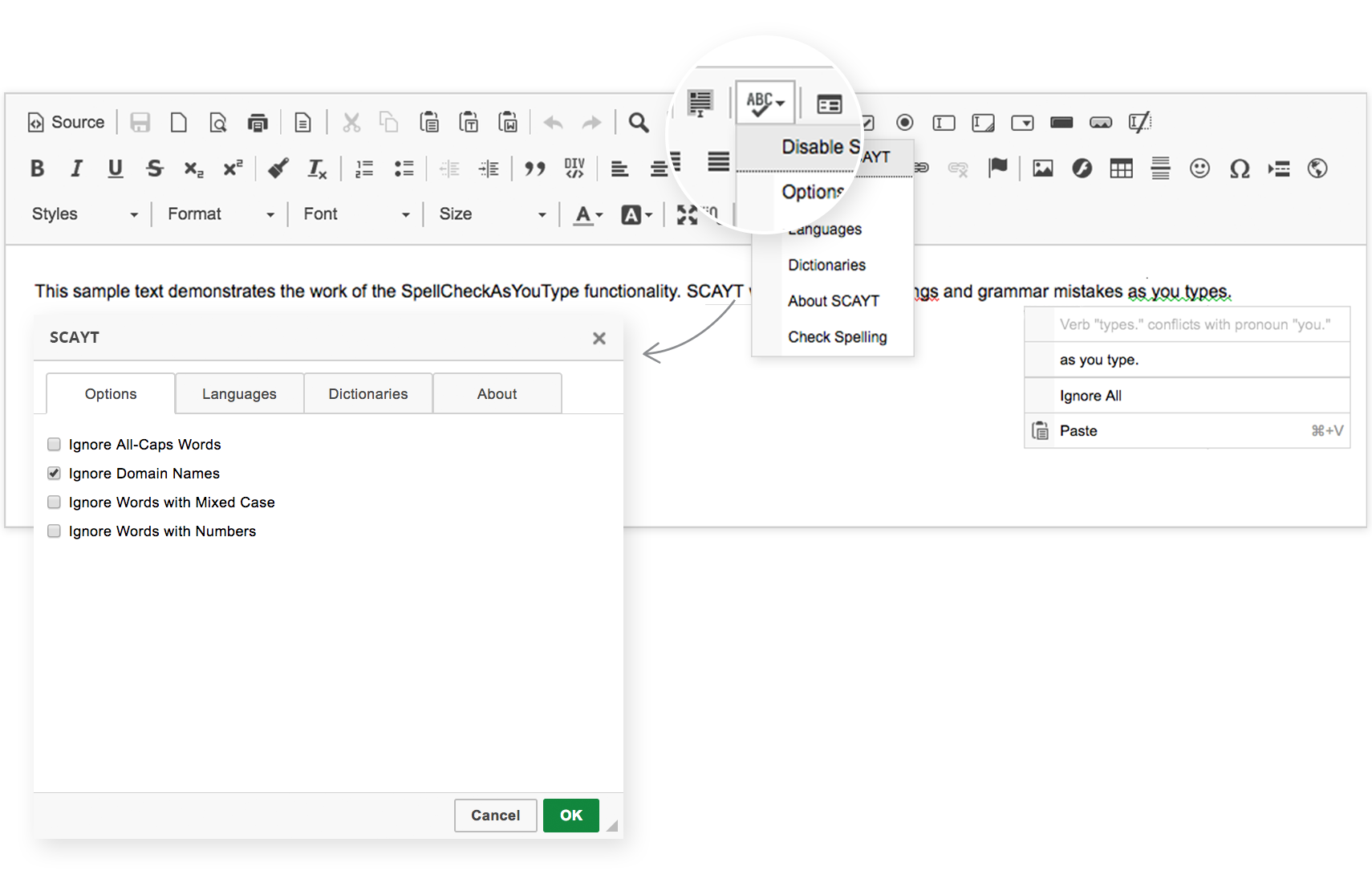
SpellCheckAsYouType (SCAYT) instantly underlines spelling and grammar errors while users type. To correct spelling or grammar error, a user simply needs to right-click the marked word to select from suggested corrections.
|
||||
|
||||
|
||||
SCAYT is a "installation-less", using the web-services of [WebSpellChecker.net](http://www.webspellchecker.net/). It's an out of the box solution.
|
||||
This plugin brings the multi-language SCAYT functionality into CKEditor 4. It is integrated by default starting with [Standard Package of CKEditor 4](https://ckeditor.com/ckeditor-4/download/). You can find it on the CKEditor 4 toolbar panel under the ABC button (Enable SCAYT).
|
||||
|
||||
Installation
|
||||
If your version of CKEditor doesn’t have SCAYT built-in, you can easily add it by following the steps outlined in the Get Started section.
|
||||
|
||||
The default version of SCAYT plugin for CKEditor 4 is using the free services of WebSpellChecker. It is provided with a banner ad and has some [limitations](https://docs.webspellchecker.net/display/WebSpellCheckerCloud/Free+and+Paid+WebSpellChecker+Cloud+Services+Comparison+for+CKEditor).
|
||||
|
||||
To lift the limitations and get rid of the banner, [obtain a license](https://webspellchecker.com/wsc-scayt-ckeditor4/#pricing). Depending on your needs, you can choose a Cloud-based or Server (self-hosted) solution.
|
||||
|
||||
Demo
|
||||
------------
|
||||
SCAYT plugin for CKEditor 4: https://webspellchecker.com/wsc-scayt-ckeditor4/
|
||||
|
||||
Supported Languages
|
||||
------------
|
||||
|
||||
The SCAYT plugin for CKEditor as a part of the free services supports the next languages for check spelling: American English, British English, Canadian English, Canadian French, Danish, Dutch, Finnish, French, German, Greek, Italian, Norwegian Bokmal, Spanish, Swedish.
|
||||
|
||||
There are also additional languages and specialized dictionaries available for a commercial license, you can check the full list [here](https://webspellchecker.com/additional-dictionaries/).
|
||||
|
||||
Get Started
|
||||
------------
|
||||
|
||||
1. Clone/copy this repository contents in a new "plugins/scayt" folder in your CKEditor installation.
|
||||
@@ -13,13 +31,51 @@ Installation
|
||||
|
||||
config.extraPlugins = 'scayt';
|
||||
|
||||
That's all. SCAYT will appear on the editor toolbar and will be ready to use.
|
||||
That's all. SCAYT will appear on the editor toolbar under the ABC button and will be ready to use.
|
||||
|
||||
Supported Browsers
|
||||
-------
|
||||
|
||||
This is the list of officially supported browsers for the SCAYT plugin for CKEditor 4. SCAYT may also work in other browsers and environments but we unable to check all of them and guarantee proper work.
|
||||
|
||||
* Chrome (the latest)
|
||||
* Firefox (the latest)
|
||||
* Safari (the latest)
|
||||
* MS Edge (the latest)
|
||||
* Internet Explorer 8.0 (limited support)
|
||||
* Internet Explorer 9.0+ (close to full support)
|
||||
|
||||
Note: All browsers are to be supported for web pages that work in Standards Mode.
|
||||
|
||||
Resources
|
||||
-------
|
||||
|
||||
* Demo: https://webspellchecker.com/wsc-scayt-ckeditor4/
|
||||
* Documentation: https://docs.webspellchecker.net/
|
||||
* YouTube video “How to Configure CKEditor 4 and SpellCheckAsYouType Plugin”: https://youtu.be/D0ahmVjYBq8
|
||||
* Term of Service: https://webspellchecker.com/terms-of-service/
|
||||
* CKEditor’s How-Tos for SCAYT: https://ckeditor.com/docs/ckeditor4/latest/guide/dev_howtos_scayt.html
|
||||
* CKEditor’s example of SCAYT: https://ckeditor.com/docs/ckeditor4/latest/examples/spellchecker.html
|
||||
|
||||
Technical Support or Questions
|
||||
-------
|
||||
|
||||
In cooperation with the CKEditor team, during the past 10 years we have simplified the installation and built the extensive amount of documentation devoted to SCAYT plugin for CKEditor 4 and less.
|
||||
|
||||
If you are experiencing any difficulties with the setup of the plugin, please check the links provided in the Resources section.
|
||||
|
||||
Holders of an active subscription to the services or a commercial license have access to professional technical assistance directly from the WebSpellChecker team. [Contact us here](https://webspellchecker.com/contact-us/)!
|
||||
|
||||
Reporting Issues
|
||||
-------
|
||||
|
||||
Please use the [SCAYT plugin for CKEditor 4 GitHub issue page](https://github.com/WebSpellChecker/ckeditor-plugin-scayt/issues) to report bugs and feature requests. We will do our best to reply at our earliest convenience.
|
||||
|
||||
License
|
||||
-------
|
||||
|
||||
Licensed under the terms of any of the following licenses at your choice: [GPL](http://www.gnu.org/licenses/gpl.html), [LGPL](http://www.gnu.org/licenses/lgpl.html) and [MPL](http://www.mozilla.org/MPL/MPL-1.1.html).
|
||||
This plugin is licensed under the terms of any of the following licenses at your choice: [GPL](http://www.gnu.org/licenses/gpl.html), [LGPL](http://www.gnu.org/licenses/lgpl.html) and [MPL](http://www.mozilla.org/MPL/MPL-1.1.html).
|
||||
|
||||
See LICENSE.md for more information.
|
||||
|
||||
Developed in cooperation with [WebSpellChecker.net](http://www.webspellchecker.net/).
|
||||
Developed by [WebSpellChecker](https://webspellchecker.com/) in cooperation with CKSource.
|
||||
|
||||
@@ -1,32 +1,32 @@
|
||||
CKEDITOR.dialog.add("scaytDialog",function(c){var d=c.scayt,k='\x3cp\x3e\x3cimg alt\x3d"logo" title\x3d"logo" src\x3d"'+d.getLogo()+'" /\x3e\x3c/p\x3e\x3cp\x3e'+d.getLocal("version")+d.getVersion()+'\x3c/p\x3e\x3cp\x3e\x3ca href\x3d"'+d.getOption("CKUserManual")+'" target\x3d"_blank" style\x3d"text-decoration: underline; color: blue; cursor: pointer;"\x3e'+d.getLocal("btn_userManual")+"\x3c/a\x3e\x3c/p\x3e\x3cp\x3e"+d.getLocal("text_copyrights")+"\x3c/p\x3e",n=CKEDITOR.document,l={isChanged:function(){return null===
|
||||
this.newLang||this.currentLang===this.newLang?!1:!0},currentLang:d.getLang(),newLang:null,reset:function(){this.currentLang=d.getLang();this.newLang=null},id:"lang"},k=[{id:"options",label:d.getLocal("tab_options"),onShow:function(){},elements:[{type:"vbox",id:"scaytOptions",children:function(){var b=d.getApplicationConfig(),a=[],e={"ignore-all-caps-words":"label_allCaps","ignore-domain-names":"label_ignoreDomainNames","ignore-words-with-mixed-cases":"label_mixedCase","ignore-words-with-numbers":"label_mixedWithDigits"},
|
||||
h;for(h in b)b={type:"checkbox"},b.id=h,b.label=d.getLocal(e[h]),a.push(b);return a}(),onShow:function(){this.getChild();for(var b=c.scayt,a=0;a<this.getChild().length;a++)this.getChild()[a].setValue(b.getApplicationConfig()[this.getChild()[a].id])}}]},{id:"langs",label:d.getLocal("tab_languages"),elements:[{id:"leftLangColumn",type:"vbox",align:"left",widths:["100"],children:[{type:"html",id:"langBox",style:"overflow: hidden; white-space: normal;margin-bottom:15px;",html:'\x3cdiv\x3e\x3cdiv style\x3d"float:left;width:45%;margin-left:5px;" id\x3d"left-col-'+
|
||||
c.name+'" class\x3d"scayt-lang-list"\x3e\x3c/div\x3e\x3cdiv style\x3d"float:left;width:45%;margin-left:15px;" id\x3d"right-col-'+c.name+'" class\x3d"scayt-lang-list"\x3e\x3c/div\x3e\x3c/div\x3e',onShow:function(){var b=c.scayt.getLang();n.getById("scaytLang_"+c.name+"_"+b).$.checked=!0}}]}]},{id:"dictionaries",label:d.getLocal("tab_dictionaries"),elements:[{type:"vbox",id:"rightCol_col__left",children:[{type:"html",id:"dictionaryNote",html:""},{type:"text",id:"dictionaryName",label:d.getLocal("label_fieldNameDic")||
|
||||
"Dictionary name",onShow:function(b){var a=b.sender,e=c.scayt;b=SCAYT.prototype.UILib;var h=a.getContentElement("dictionaries","dictionaryName").getInputElement().$;e.isLicensed()||(h.disabled=!0,b.css(h,{cursor:"not-allowed"}));setTimeout(function(){a.getContentElement("dictionaries","dictionaryNote").getElement().setText("");null!=e.getUserDictionaryName()&&""!=e.getUserDictionaryName()&&a.getContentElement("dictionaries","dictionaryName").setValue(e.getUserDictionaryName())},0)}},{type:"hbox",
|
||||
id:"udButtonsHolder",align:"left",widths:["auto"],style:"width:auto;",children:[{type:"button",id:"createDic",label:d.getLocal("btn_createDic"),title:d.getLocal("btn_createDic"),onLoad:function(){this.getDialog();var b=c.scayt,a=SCAYT.prototype.UILib,e=this.getElement().$,h=this.getElement().getChild(0).$;b.isLicensed()||(a.css(e,{cursor:"not-allowed"}),a.css(h,{cursor:"not-allowed"}))},onClick:function(){var b=this.getDialog(),a=g,e=c.scayt,h=b.getContentElement("dictionaries","dictionaryName").getValue();
|
||||
e.isLicensed()&&e.createUserDictionary(h,function(f){f.error||a.toggleDictionaryState.call(b,"dictionaryState");f.dialog=b;f.command="create";f.name=h;c.fire("scaytUserDictionaryAction",f)},function(a){a.dialog=b;a.command="create";a.name=h;c.fire("scaytUserDictionaryActionError",a)})}},{type:"button",id:"restoreDic",label:d.getLocal("btn_connectDic"),title:d.getLocal("btn_connectDic"),onLoad:function(){this.getDialog();var b=c.scayt,a=SCAYT.prototype.UILib,e=this.getElement().$,h=this.getElement().getChild(0).$;
|
||||
b.isLicensed()||(a.css(e,{cursor:"not-allowed"}),a.css(h,{cursor:"not-allowed"}))},onClick:function(){var b=this.getDialog(),a=c.scayt,e=g,h=b.getContentElement("dictionaries","dictionaryName").getValue();a.isLicensed()&&a.restoreUserDictionary(h,function(a){a.dialog=b;a.error||e.toggleDictionaryState.call(b,"dictionaryState");a.command="restore";a.name=h;c.fire("scaytUserDictionaryAction",a)},function(a){a.dialog=b;a.command="restore";a.name=h;c.fire("scaytUserDictionaryActionError",a)})}},{type:"button",
|
||||
id:"disconnectDic",label:d.getLocal("btn_disconnectDic"),title:d.getLocal("btn_disconnectDic"),onClick:function(){var b=this.getDialog(),a=c.scayt,e=g,h=b.getContentElement("dictionaries","dictionaryName"),f=h.getValue();a.isLicensed()&&(a.disconnectFromUserDictionary({}),h.setValue(""),e.toggleDictionaryState.call(b,"initialState"),c.fire("scaytUserDictionaryAction",{dialog:b,command:"disconnect",name:f}))}},{type:"button",id:"removeDic",label:d.getLocal("btn_deleteDic"),title:d.getLocal("btn_deleteDic"),
|
||||
onClick:function(){var b=this.getDialog(),a=c.scayt,e=g,h=b.getContentElement("dictionaries","dictionaryName"),f=h.getValue();a.isLicensed()&&a.removeUserDictionary(f,function(a){h.setValue("");a.error||e.toggleDictionaryState.call(b,"initialState");a.dialog=b;a.command="remove";a.name=f;c.fire("scaytUserDictionaryAction",a)},function(a){a.dialog=b;a.command="remove";a.name=f;c.fire("scaytUserDictionaryActionError",a)})}},{type:"button",id:"renameDic",label:d.getLocal("btn_renameDic"),title:d.getLocal("btn_renameDic"),
|
||||
onClick:function(){var b=this.getDialog(),a=c.scayt,e=b.getContentElement("dictionaries","dictionaryName").getValue();a.isLicensed()&&a.renameUserDictionary(e,function(a){a.dialog=b;a.command="rename";a.name=e;c.fire("scaytUserDictionaryAction",a)},function(a){a.dialog=b;a.command="rename";a.name=e;c.fire("scaytUserDictionaryActionError",a)})}},{type:"button",id:"editDic",label:d.getLocal("btn_goToDic"),title:d.getLocal("btn_goToDic"),onLoad:function(){this.getDialog()},onClick:function(){var b=this.getDialog(),
|
||||
a=b.getContentElement("dictionaries","addWordField");g.clearWordList.call(b);a.setValue("");g.getUserDictionary.call(b);g.toggleDictionaryState.call(b,"wordsState")}}]},{type:"hbox",id:"dicInfo",align:"left",children:[{type:"html",id:"dicInfoHtml",html:'\x3cdiv id\x3d"dic_info_editor1" style\x3d"margin:5px auto; width:95%;white-space:normal;"\x3e'+(c.scayt.isLicensed&&c.scayt.isLicensed()?'\x3ca href\x3d"'+d.getOption("CKUserManual")+'" target\x3d"_blank" style\x3d"text-decoration: underline; color: blue; cursor: pointer;"\x3e'+
|
||||
d.getLocal("text_descriptionDicForPaid")+"\x3c/a\x3e":d.getLocal("text_descriptionDicForFree"))+"\x3c/div\x3e"}]},{id:"addWordAction",type:"hbox",style:"width: 100%; margin-bottom: 0;",widths:["40%","60%"],children:[{id:"addWord",type:"vbox",style:"min-width: 150px;",children:[{type:"text",id:"addWordField",label:"Add word",maxLength:"64"}]},{id:"addWordButtons",type:"vbox",style:"margin-top: 20px;",children:[{type:"hbox",id:"addWordButton",align:"left",children:[{type:"button",id:"addWord",label:d.getLocal("btn_addWord"),
|
||||
title:d.getLocal("btn_addWord"),onClick:function(){var b=this.getDialog(),a=c.scayt,e=b.getContentElement("dictionaries","itemList"),h=b.getContentElement("dictionaries","addWordField"),f=h.getValue(),d=a.getOption("wordBoundaryRegex"),g=this;f&&(-1!==f.search(d)?c.fire("scaytUserDictionaryAction",{dialog:b,command:"wordWithBannedSymbols",name:f,error:!0}):e.inChildren(f)?(h.setValue(""),c.fire("scaytUserDictionaryAction",{dialog:b,command:"wordAlreadyAdded",name:f})):(this.disable(),a.addWordToUserDictionary(f,
|
||||
function(a){a.error||(h.setValue(""),e.addChild(f,!0));a.dialog=b;a.command="addWord";a.name=f;g.enable();c.fire("scaytUserDictionaryAction",a)},function(a){a.dialog=b;a.command="addWord";a.name=f;g.enable();c.fire("scaytUserDictionaryActionError",a)})))}},{type:"button",id:"backToDic",label:d.getLocal("btn_dictionaryPreferences"),title:d.getLocal("btn_dictionaryPreferences"),align:"right",onClick:function(){var b=this.getDialog(),a=c.scayt;null!=a.getUserDictionaryName()&&""!=a.getUserDictionaryName()?
|
||||
g.toggleDictionaryState.call(b,"dictionaryState"):g.toggleDictionaryState.call(b,"initialState")}}]}]}]},{id:"wordsHolder",type:"hbox",style:"width: 100%; height: 170px; margin-bottom: 0;",children:[{type:"scaytItemList",id:"itemList",align:"left",style:"width: 100%; height: 170px; overflow: auto",onClick:function(b){var a=b.data.$;b=c.scayt;var e=SCAYT.prototype.UILib,a=a.target||a.srcElement,h=e.parent(a)[0],f=e.attr(h,"data-cke-scayt-ud-word"),d=this.getDialog(),g=d.getContentElement("dictionaries",
|
||||
"itemList"),q=this;e.hasClass(a,"cke_scaytItemList_remove")&&!this.isBlocked()&&(this.block(),b.deleteWordFromUserDictionary(f,function(a){a.error||g.removeChild(h,f);q.unblock();a.dialog=d;a.command="deleteWord";a.name=f;c.fire("scaytUserDictionaryAction",a)},function(a){q.unblock();a.dialog=d;a.command="deleteWord";a.name=f;c.fire("scaytUserDictionaryActionError",a)}))}}]}]}]},{id:"about",label:d.getLocal("tab_about"),elements:[{type:"html",id:"about",style:"margin: 5px 5px;",html:'\x3cdiv\x3e\x3cdiv id\x3d"scayt_about_"\x3e'+
|
||||
k+"\x3c/div\x3e\x3c/div\x3e"}]}];c.on("scaytUserDictionaryAction",function(b){var a=SCAYT.prototype.UILib,e=b.data.dialog,c=e.getContentElement("dictionaries","dictionaryNote").getElement(),f=b.editor.scayt,d;void 0===b.data.error?(d=f.getLocal("message_success_"+b.data.command+"Dic"),d=d.replace("%s",b.data.name),c.setText(d),a.css(c.$,{color:"blue"})):(""===b.data.name?c.setText(f.getLocal("message_info_emptyDic")):(d=f.getLocal("message_error_"+b.data.command+"Dic"),d=d.replace("%s",b.data.name),
|
||||
c.setText(d)),a.css(c.$,{color:"red"}),null!=f.getUserDictionaryName()&&""!=f.getUserDictionaryName()?e.getContentElement("dictionaries","dictionaryName").setValue(f.getUserDictionaryName()):e.getContentElement("dictionaries","dictionaryName").setValue(""))});c.on("scaytUserDictionaryActionError",function(b){var a=SCAYT.prototype.UILib,e=b.data.dialog,c=e.getContentElement("dictionaries","dictionaryNote").getElement(),d=b.editor.scayt,g;""===b.data.name?c.setText(d.getLocal("message_info_emptyDic")):
|
||||
(g=d.getLocal("message_error_"+b.data.command+"Dic"),g=g.replace("%s",b.data.name),c.setText(g));a.css(c.$,{color:"red"});null!=d.getUserDictionaryName()&&""!=d.getUserDictionaryName()?e.getContentElement("dictionaries","dictionaryName").setValue(d.getUserDictionaryName()):e.getContentElement("dictionaries","dictionaryName").setValue("")});var g={title:"SCAYT",resizable:CKEDITOR.DIALOG_RESIZE_BOTH,minWidth:"moono-lisa"==(CKEDITOR.skinName||c.config.skin)?450:340,minHeight:300,onLoad:function(){if(0!=
|
||||
c.config.scayt_uiTabs[1]){var b=g,a=b.getLangBoxes.call(this);this.getContentElement("dictionaries","addWordField");a.getParent().setStyle("white-space","normal");b.renderLangList(a);this.definition.minWidth=this.getSize().width;this.resize(this.definition.minWidth,this.definition.minHeight)}},onCancel:function(){l.reset()},onHide:function(){c.unlockSelection()},onShow:function(){c.fire("scaytDialogShown",this);if(0!=c.config.scayt_uiTabs[2]){var b=this.getContentElement("dictionaries","addWordField");
|
||||
g.clearWordList.call(this);b.setValue("");g.getUserDictionary.call(this);g.toggleDictionaryState.call(this,"wordsState")}},onOk:function(){var b=g,a=c.scayt;this.getContentElement("options","scaytOptions");b=b.getChangedOption.call(this);a.commitOption({changedOptions:b})},toggleDictionaryButtons:function(b){var a=this.getContentElement("dictionaries","existDic").getElement().getParent(),c=this.getContentElement("dictionaries","notExistDic").getElement().getParent();b?(a.show(),c.hide()):(a.hide(),
|
||||
c.show())},getChangedOption:function(){var b={};if(1==c.config.scayt_uiTabs[0])for(var a=this.getContentElement("options","scaytOptions").getChild(),e=0;e<a.length;e++)a[e].isChanged()&&(b[a[e].id]=a[e].getValue());l.isChanged()&&(b[l.id]=c.config.scayt_sLang=l.currentLang=l.newLang);return b},buildRadioInputs:function(b,a,e){e=new CKEDITOR.dom.element("div");var d="scaytLang_"+c.name+"_"+a,f=CKEDITOR.dom.element.createFromHtml('\x3cinput id\x3d"'+d+'" type\x3d"radio" value\x3d"'+a+'" name\x3d"scayt_lang" /\x3e'),
|
||||
g=new CKEDITOR.dom.element("label"),k=c.scayt;e.setStyles({"white-space":"normal",position:"relative","padding-bottom":"2px"});f.on("click",function(a){l.newLang=a.sender.getValue()});g.appendText(b);g.setAttribute("for",d);e.append(f);e.append(g);a===k.getLang()&&(f.setAttribute("checked",!0),f.setAttribute("defaultChecked","defaultChecked"));return e},renderLangList:function(b){var a=b.find("#left-col-"+c.name).getItem(0);b=b.find("#right-col-"+c.name).getItem(0);var e=d.getScaytLangList(),h=d.getGraytLangList(),
|
||||
f={},g=[],k=0,l=!1,m;for(m in e.ltr)f[m]=e.ltr[m];for(m in e.rtl)f[m]=e.rtl[m];for(m in f)g.push([m,f[m]]);g.sort(function(a,b){var c=0;a[1]>b[1]?c=1:a[1]<b[1]&&(c=-1);return c});f={};for(l=0;l<g.length;l++)f[g[l][0]]=g[l][1];g=Math.round(g.length/2);for(m in f)k++,l=m in h.ltr||m in h.rtl,this.buildRadioInputs(f[m],m,l).appendTo(k<=g?a:b)},getLangBoxes:function(){return this.getContentElement("langs","langBox").getElement()},toggleDictionaryState:function(b){var a=this.getContentElement("dictionaries",
|
||||
"dictionaryName").getElement().getParent(),c=this.getContentElement("dictionaries","udButtonsHolder").getElement().getParent(),d=this.getContentElement("dictionaries","createDic").getElement().getParent(),f=this.getContentElement("dictionaries","restoreDic").getElement().getParent(),g=this.getContentElement("dictionaries","disconnectDic").getElement().getParent(),l=this.getContentElement("dictionaries","removeDic").getElement().getParent(),k=this.getContentElement("dictionaries","renameDic").getElement().getParent(),
|
||||
m=this.getContentElement("dictionaries","dicInfo").getElement().getParent(),n=this.getContentElement("dictionaries","addWordAction").getElement().getParent(),p=this.getContentElement("dictionaries","wordsHolder").getElement().getParent();switch(b){case "initialState":a.show();c.show();d.show();f.show();g.hide();l.hide();k.hide();m.show();n.hide();p.hide();break;case "wordsState":a.hide();c.hide();m.hide();n.show();p.show();break;case "dictionaryState":a.show(),c.show(),d.hide(),f.hide(),g.show(),
|
||||
l.show(),k.show(),m.show(),n.hide(),p.hide()}},clearWordList:function(){this.getContentElement("dictionaries","itemList").removeAllChild()},getUserDictionary:function(){var b=this,a=c.scayt;a.getUserDictionary(a.getUserDictionaryName(),function(a){a.error||g.renderItemList.call(b,a.wordlist)})},renderItemList:function(b){for(var a=this.getContentElement("dictionaries","itemList"),c=0;c<b.length;c++)a.addChild(b[c])},contents:function(b,a){var c=[],d=a.config.scayt_uiTabs;if(d){for(var f in d)1==d[f]&&
|
||||
c.push(b[f]);c.push(b[b.length-1])}else return b;return c}(k,c)};return g});CKEDITOR.tools.extend(CKEDITOR.ui.dialog,{scaytItemList:function(c,d,k){if(arguments.length){var n=this;c.on("load",function(){n.getElement().on("click",function(c){})});CKEDITOR.ui.dialog.uiElement.call(this,c,d,k,"",null,null,function(){var c=['\x3cp class\x3d"cke_dialog_ui_',d.type,'"'];d.style&&c.push('style\x3d"'+d.style+'" ');c.push("\x3e");c.push("\x3c/p\x3e");return c.join("")})}}});
|
||||
CKEDITOR.ui.dialog.scaytItemList.prototype=CKEDITOR.tools.extend(new CKEDITOR.ui.dialog.uiElement,{children:[],blocked:!1,addChild:function(c,d){var k=new CKEDITOR.dom.element("p"),n=new CKEDITOR.dom.element("a"),l=this.getElement().getChildren().getItem(0);this.children.push(c);k.addClass("cke_scaytItemList-child");k.setAttribute("data-cke-scayt-ud-word",c);k.appendText(c);n.addClass("cke_scaytItemList_remove");n.addClass("cke_dialog_close_button");n.setAttribute("href","javascript:void(0)");k.append(n);
|
||||
l.append(k,d?!0:!1)},inChildren:function(c){return SCAYT.prototype.Utils.inArray(this.children,c)},removeChild:function(c,d){this.children.splice(SCAYT.prototype.Utils.indexOf(this.children,d),1);this.getElement().getChildren().getItem(0).$.removeChild(c)},removeAllChild:function(){this.children=[];this.getElement().getChildren().getItem(0).setHtml("")},block:function(){this.blocked=!0},unblock:function(){this.blocked=!1},isBlocked:function(){return this.blocked}});
|
||||
(function(){commonBuilder={build:function(c,d,k){return new CKEDITOR.ui.dialog[d.type](c,d,k)}};CKEDITOR.dialog.addUIElement("scaytItemList",commonBuilder)})();
|
||||
CKEDITOR.dialog.add("scaytDialog",function(d){var c=d.scayt,k='\x3cp\x3e\x3cimg alt\x3d"logo" title\x3d"logo" src\x3d"'+c.getLogo()+'" /\x3e\x3c/p\x3e\x3cp\x3e'+c.getLocal("version")+c.getVersion()+'\x3c/p\x3e\x3cp\x3e\x3ca href\x3d"'+c.getOption("CKUserManual")+'" target\x3d"_blank" style\x3d"text-decoration: underline; color: blue; cursor: pointer;"\x3e'+c.getLocal("btn_userManual")+"\x3c/a\x3e\x3c/p\x3e\x3cp\x3e"+c.getLocal("text_copyrights")+"\x3c/p\x3e",n=CKEDITOR.document,l={isChanged:function(){return null===
|
||||
this.newLang||this.currentLang===this.newLang?!1:!0},currentLang:c.getLang(),newLang:null,reset:function(){this.currentLang=c.getLang();this.newLang=null},id:"lang"},k=[{id:"options",label:c.getLocal("tab_options"),onShow:function(){},elements:[{type:"vbox",id:"scaytOptions",children:function(){var b=c.getApplicationConfig(),a=[],g={"ignore-all-caps-words":"label_allCaps","ignore-domain-names":"label_ignoreDomainNames","ignore-words-with-mixed-cases":"label_mixedCase","ignore-words-with-numbers":"label_mixedWithDigits"},
|
||||
h;for(h in b)b={type:"checkbox"},b.id=h,b.label=c.getLocal(g[h]),a.push(b);return a}(),onShow:function(){this.getChild();for(var b=d.scayt,a=0;a<this.getChild().length;a++)this.getChild()[a].setValue(b.getApplicationConfig()[this.getChild()[a].id])}}]},{id:"langs",label:c.getLocal("tab_languages"),elements:[{id:"leftLangColumn",type:"vbox",align:"left",widths:["100"],children:[{type:"html",id:"langBox",style:"overflow: hidden; white-space: normal;margin-bottom:15px;",html:'\x3cdiv\x3e\x3cdiv style\x3d"float:left;width:45%;margin-left:5px;" id\x3d"left-col-'+
|
||||
d.name+'" class\x3d"scayt-lang-list"\x3e\x3c/div\x3e\x3cdiv style\x3d"float:left;width:45%;margin-left:15px;" id\x3d"right-col-'+d.name+'" class\x3d"scayt-lang-list"\x3e\x3c/div\x3e\x3c/div\x3e',onShow:function(){var b=d.scayt.getLang();n.getById("scaytLang_"+d.name+"_"+b).$.checked=!0}}]}]},{id:"dictionaries",label:c.getLocal("tab_dictionaries"),elements:[{type:"vbox",id:"rightCol_col__left",children:[{type:"html",id:"dictionaryNote",html:""},{type:"text",id:"dictionaryName",label:c.getLocal("label_fieldNameDic")||
|
||||
"Dictionary name",onShow:function(b){var a=b.sender,g=d.scayt;b=SCAYT.prototype.UILib;var h=a.getContentElement("dictionaries","dictionaryName").getInputElement().$;g.isLicensed()||(h.disabled=!0,b.css(h,{cursor:"not-allowed"}));setTimeout(function(){a.getContentElement("dictionaries","dictionaryNote").getElement().setText("");null!=g.getUserDictionaryName()&&""!=g.getUserDictionaryName()&&a.getContentElement("dictionaries","dictionaryName").setValue(g.getUserDictionaryName())},0)}},{type:"hbox",
|
||||
id:"udButtonsHolder",align:"left",widths:["auto"],style:"width:auto;",children:[{type:"button",id:"createDic",label:c.getLocal("btn_createDic"),title:c.getLocal("btn_createDic"),onLoad:function(){this.getDialog();var b=d.scayt,a=SCAYT.prototype.UILib,g=this.getElement().$,h=this.getElement().getChild(0).$;b.isLicensed()||(a.css(g,{cursor:"not-allowed"}),a.css(h,{cursor:"not-allowed"}))},onClick:function(){var b=this.getDialog(),a=f,g=d.scayt,h=b.getContentElement("dictionaries","dictionaryName").getValue();
|
||||
g.isLicensed()&&g.createUserDictionary(h,function(e){e.error||a.toggleDictionaryState.call(b,"dictionaryState");e.dialog=b;e.command="create";e.name=h;d.fire("scaytUserDictionaryAction",e)},function(a){a.dialog=b;a.command="create";a.name=h;d.fire("scaytUserDictionaryActionError",a)})}},{type:"button",id:"restoreDic",label:c.getLocal("btn_connectDic"),title:c.getLocal("btn_connectDic"),onLoad:function(){this.getDialog();var b=d.scayt,a=SCAYT.prototype.UILib,g=this.getElement().$,h=this.getElement().getChild(0).$;
|
||||
b.isLicensed()||(a.css(g,{cursor:"not-allowed"}),a.css(h,{cursor:"not-allowed"}))},onClick:function(){var b=this.getDialog(),a=d.scayt,g=f,h=b.getContentElement("dictionaries","dictionaryName").getValue();a.isLicensed()&&a.restoreUserDictionary(h,function(a){a.dialog=b;a.error||g.toggleDictionaryState.call(b,"dictionaryState");a.command="restore";a.name=h;d.fire("scaytUserDictionaryAction",a)},function(a){a.dialog=b;a.command="restore";a.name=h;d.fire("scaytUserDictionaryActionError",a)})}},{type:"button",
|
||||
id:"disconnectDic",label:c.getLocal("btn_disconnectDic"),title:c.getLocal("btn_disconnectDic"),onClick:function(){var b=this.getDialog(),a=d.scayt,g=f,h=b.getContentElement("dictionaries","dictionaryName"),e=h.getValue();a.isLicensed()&&(a.disconnectFromUserDictionary({}),h.setValue(""),g.toggleDictionaryState.call(b,"initialState"),d.fire("scaytUserDictionaryAction",{dialog:b,command:"disconnect",name:e}))}},{type:"button",id:"removeDic",label:c.getLocal("btn_deleteDic"),title:c.getLocal("btn_deleteDic"),
|
||||
onClick:function(){var b=this.getDialog(),a=d.scayt,g=f,h=b.getContentElement("dictionaries","dictionaryName"),e=h.getValue();a.isLicensed()&&a.removeUserDictionary(e,function(a){h.setValue("");a.error||g.toggleDictionaryState.call(b,"initialState");a.dialog=b;a.command="remove";a.name=e;d.fire("scaytUserDictionaryAction",a)},function(a){a.dialog=b;a.command="remove";a.name=e;d.fire("scaytUserDictionaryActionError",a)})}},{type:"button",id:"renameDic",label:c.getLocal("btn_renameDic"),title:c.getLocal("btn_renameDic"),
|
||||
onClick:function(){var b=this.getDialog(),a=d.scayt,g=b.getContentElement("dictionaries","dictionaryName").getValue();a.isLicensed()&&a.renameUserDictionary(g,function(a){a.dialog=b;a.command="rename";a.name=g;d.fire("scaytUserDictionaryAction",a)},function(a){a.dialog=b;a.command="rename";a.name=g;d.fire("scaytUserDictionaryActionError",a)})}},{type:"button",id:"editDic",label:c.getLocal("btn_goToDic"),title:c.getLocal("btn_goToDic"),onLoad:function(){this.getDialog()},onClick:function(){var b=this.getDialog(),
|
||||
a=b.getContentElement("dictionaries","addWordField");f.clearWordList.call(b);a.setValue("");f.getUserDictionary.call(b);f.toggleDictionaryState.call(b,"wordsState")}}]},{type:"hbox",id:"dicInfo",align:"left",children:[{type:"html",id:"dicInfoHtml",html:'\x3cdiv id\x3d"dic_info_editor1" style\x3d"margin:5px auto; width:95%;white-space:normal;"\x3e'+(d.scayt.isLicensed&&d.scayt.isLicensed()?'\x3ca href\x3d"'+c.getOption("CKUserManual")+'" target\x3d"_blank" style\x3d"text-decoration: underline; color: blue; cursor: pointer;"\x3e'+
|
||||
c.getLocal("text_descriptionDicForPaid")+"\x3c/a\x3e":c.getLocal("text_descriptionDicForFree"))+"\x3c/div\x3e"}]},{id:"addWordAction",type:"hbox",style:"width: 100%; margin-bottom: 0;",widths:["40%","60%"],children:[{id:"addWord",type:"vbox",style:"min-width: 150px;",children:[{type:"text",id:"addWordField",label:"Add word",maxLength:"64"}]},{id:"addWordButtons",type:"vbox",style:"margin-top: 20px;",children:[{type:"hbox",id:"addWordButton",align:"left",children:[{type:"button",id:"addWord",label:c.getLocal("btn_addWord"),
|
||||
title:c.getLocal("btn_addWord"),onClick:function(){var b=this.getDialog(),a=d.scayt,g=b.getContentElement("dictionaries","itemList"),h=b.getContentElement("dictionaries","addWordField"),e=h.getValue(),c=a.getOption("wordBoundaryRegex"),f=this;e&&(-1!==e.search(c)?d.fire("scaytUserDictionaryAction",{dialog:b,command:"wordWithBannedSymbols",name:e,error:!0}):g.inChildren(e)?(h.setValue(""),d.fire("scaytUserDictionaryAction",{dialog:b,command:"wordAlreadyAdded",name:e})):(this.disable(),a.addWordToUserDictionary(e,
|
||||
function(a){a.error||(h.setValue(""),g.addChild(e,!0));a.dialog=b;a.command="addWord";a.name=e;f.enable();d.fire("scaytUserDictionaryAction",a)},function(a){a.dialog=b;a.command="addWord";a.name=e;f.enable();d.fire("scaytUserDictionaryActionError",a)})))}},{type:"button",id:"backToDic",label:c.getLocal("btn_dictionaryPreferences"),title:c.getLocal("btn_dictionaryPreferences"),align:"right",onClick:function(){var b=this.getDialog(),a=d.scayt;null!=a.getUserDictionaryName()&&""!=a.getUserDictionaryName()?
|
||||
f.toggleDictionaryState.call(b,"dictionaryState"):f.toggleDictionaryState.call(b,"initialState")}}]}]}]},{id:"wordsHolder",type:"hbox",style:"width: 100%; height: 170px; margin-bottom: 0;",children:[{type:"scaytItemList",id:"itemList",align:"left",style:"width: 100%; height: 170px; overflow: auto",onClick:function(b){var a=b.data.$;b=d.scayt;var g=SCAYT.prototype.UILib,a=a.target||a.srcElement,h=g.parent(a)[0],e=g.attr(h,"data-cke-scayt-ud-word"),c=this.getDialog(),f=c.getContentElement("dictionaries",
|
||||
"itemList"),q=this;g.hasClass(a,"cke_scaytItemList_remove")&&!this.isBlocked()&&(this.block(),b.deleteWordFromUserDictionary(e,function(a){a.error||f.removeChild(h,e);q.unblock();a.dialog=c;a.command="deleteWord";a.name=e;d.fire("scaytUserDictionaryAction",a)},function(a){q.unblock();a.dialog=c;a.command="deleteWord";a.name=e;d.fire("scaytUserDictionaryActionError",a)}))}}]}]}]},{id:"about",label:c.getLocal("tab_about"),elements:[{type:"html",id:"about",style:"margin: 5px 5px;",html:'\x3cdiv\x3e\x3cdiv id\x3d"scayt_about_"\x3e'+
|
||||
k+"\x3c/div\x3e\x3c/div\x3e"}]}];d.on("scaytUserDictionaryAction",function(b){var a=SCAYT.prototype.UILib,g=b.data.dialog,d=g.getContentElement("dictionaries","dictionaryNote").getElement(),e=b.editor.scayt,c;void 0===b.data.error?(c=e.getLocal("message_success_"+b.data.command+"Dic"),c=c.replace("%s",b.data.name),d.setText(c),a.css(d.$,{color:"blue"})):(""===b.data.name?d.setText(e.getLocal("message_info_emptyDic")):(c=e.getLocal("message_error_"+b.data.command+"Dic"),c=c.replace("%s",b.data.name),
|
||||
d.setText(c)),a.css(d.$,{color:"red"}),null!=e.getUserDictionaryName()&&""!=e.getUserDictionaryName()?g.getContentElement("dictionaries","dictionaryName").setValue(e.getUserDictionaryName()):g.getContentElement("dictionaries","dictionaryName").setValue(""))});d.on("scaytUserDictionaryActionError",function(b){var a=SCAYT.prototype.UILib,g=b.data.dialog,d=g.getContentElement("dictionaries","dictionaryNote").getElement(),c=b.editor.scayt,f;""===b.data.name?d.setText(c.getLocal("message_info_emptyDic")):
|
||||
(f=c.getLocal("message_error_"+b.data.command+"Dic"),f=f.replace("%s",b.data.name),d.setText(f));a.css(d.$,{color:"red"});null!=c.getUserDictionaryName()&&""!=c.getUserDictionaryName()?g.getContentElement("dictionaries","dictionaryName").setValue(c.getUserDictionaryName()):g.getContentElement("dictionaries","dictionaryName").setValue("")});var f={title:"SCAYT",resizable:CKEDITOR.DIALOG_RESIZE_BOTH,minWidth:"moono-lisa"==(CKEDITOR.skinName||d.config.skin)?450:340,minHeight:300,onLoad:function(){if(0!=
|
||||
d.config.scayt_uiTabs[1]){var b=f,a=b.getLangBoxes.call(this);this.getContentElement("dictionaries","addWordField");a.getParent().setStyle("white-space","normal");b.renderLangList(a);this.definition.minWidth=this.getSize().width;this.resize(this.definition.minWidth,this.definition.minHeight)}},onCancel:function(){l.reset()},onHide:function(){d.unlockSelection()},onShow:function(){d.fire("scaytDialogShown",this);if(0!=d.config.scayt_uiTabs[2]){var b=this.getContentElement("dictionaries","addWordField");
|
||||
f.clearWordList.call(this);b.setValue("");f.getUserDictionary.call(this);f.toggleDictionaryState.call(this,"wordsState")}},onOk:function(){var b=f,a=d.scayt;this.getContentElement("options","scaytOptions");b=b.getChangedOption.call(this);a.commitOption({changedOptions:b})},toggleDictionaryButtons:function(b){var a=this.getContentElement("dictionaries","existDic").getElement().getParent(),d=this.getContentElement("dictionaries","notExistDic").getElement().getParent();b?(a.show(),d.hide()):(a.hide(),
|
||||
d.show())},getChangedOption:function(){var b={};if(1==d.config.scayt_uiTabs[0])for(var a=this.getContentElement("options","scaytOptions").getChild(),c=0;c<a.length;c++)a[c].isChanged()&&(b[a[c].id]=a[c].getValue());l.isChanged()&&(b[l.id]=d.config.scayt_sLang=l.currentLang=l.newLang);return b},buildRadioInputs:function(b,a,c){c=new CKEDITOR.dom.element("div");var h="scaytLang_"+d.name+"_"+a,e=CKEDITOR.dom.element.createFromHtml('\x3cinput id\x3d"'+h+'" type\x3d"radio" value\x3d"'+a+'" name\x3d"scayt_lang" /\x3e'),
|
||||
f=new CKEDITOR.dom.element("label"),k=d.scayt;c.setStyles({"white-space":"normal",position:"relative","padding-bottom":"2px"});e.on("click",function(a){l.newLang=a.sender.getValue()});f.appendText(b);f.setAttribute("for",h);c.append(e);c.append(f);a===k.getLang()&&(e.setAttribute("checked",!0),e.setAttribute("defaultChecked","defaultChecked"));return c},renderLangList:function(b){var a=d.name.replace(/(:|\.|\[|\]|,|=|@)/g,"\\$1"),g=b.find("#left-col-"+a).getItem(0);b=b.find("#right-col-"+a).getItem(0);
|
||||
var h=c.getScaytLangList(),a=c.getGraytLangList(),e={},f=[],k=0,l=!1,m;for(m in h.ltr)e[m]=h.ltr[m];for(m in h.rtl)e[m]=h.rtl[m];for(m in e)f.push([m,e[m]]);f.sort(function(a,b){var c=0;a[1]>b[1]?c=1:a[1]<b[1]&&(c=-1);return c});e={};for(l=0;l<f.length;l++)e[f[l][0]]=f[l][1];f=Math.round(f.length/2);for(m in e)k++,l=m in a.ltr||m in a.rtl,this.buildRadioInputs(e[m],m,l).appendTo(k<=f?g:b)},getLangBoxes:function(){return this.getContentElement("langs","langBox").getElement()},toggleDictionaryState:function(b){var a=
|
||||
this.getContentElement("dictionaries","dictionaryName").getElement().getParent(),c=this.getContentElement("dictionaries","udButtonsHolder").getElement().getParent(),d=this.getContentElement("dictionaries","createDic").getElement().getParent(),e=this.getContentElement("dictionaries","restoreDic").getElement().getParent(),f=this.getContentElement("dictionaries","disconnectDic").getElement().getParent(),l=this.getContentElement("dictionaries","removeDic").getElement().getParent(),k=this.getContentElement("dictionaries",
|
||||
"renameDic").getElement().getParent(),m=this.getContentElement("dictionaries","dicInfo").getElement().getParent(),n=this.getContentElement("dictionaries","addWordAction").getElement().getParent(),p=this.getContentElement("dictionaries","wordsHolder").getElement().getParent();switch(b){case "initialState":a.show();c.show();d.show();e.show();f.hide();l.hide();k.hide();m.show();n.hide();p.hide();break;case "wordsState":a.hide();c.hide();m.hide();n.show();p.show();break;case "dictionaryState":a.show(),
|
||||
c.show(),d.hide(),e.hide(),f.show(),l.show(),k.show(),m.show(),n.hide(),p.hide()}},clearWordList:function(){this.getContentElement("dictionaries","itemList").removeAllChild()},getUserDictionary:function(){var b=this,a=d.scayt;a.getUserDictionary(a.getUserDictionaryName(),function(a){a.error||f.renderItemList.call(b,a.wordlist)})},renderItemList:function(b){for(var a=this.getContentElement("dictionaries","itemList"),c=0;c<b.length;c++)a.addChild(b[c])},contents:function(b,a){var c=[],d=a.config.scayt_uiTabs;
|
||||
if(d){for(var e in d)1==d[e]&&c.push(b[e]);c.push(b[b.length-1])}else return b;return c}(k,d)};return f});CKEDITOR.tools.extend(CKEDITOR.ui.dialog,{scaytItemList:function(d,c,k){if(arguments.length){var n=this;d.on("load",function(){n.getElement().on("click",function(c){})});CKEDITOR.ui.dialog.uiElement.call(this,d,c,k,"",null,null,function(){var d=['\x3cp class\x3d"cke_dialog_ui_',c.type,'"'];c.style&&d.push('style\x3d"'+c.style+'" ');d.push("\x3e");d.push("\x3c/p\x3e");return d.join("")})}}});
|
||||
CKEDITOR.ui.dialog.scaytItemList.prototype=CKEDITOR.tools.extend(new CKEDITOR.ui.dialog.uiElement,{children:[],blocked:!1,addChild:function(d,c){var k=new CKEDITOR.dom.element("p"),n=new CKEDITOR.dom.element("a"),l=this.getElement().getChildren().getItem(0);this.children.push(d);k.addClass("cke_scaytItemList-child");k.setAttribute("data-cke-scayt-ud-word",d);k.appendText(d);n.addClass("cke_scaytItemList_remove");n.addClass("cke_dialog_close_button");n.setAttribute("href","javascript:void(0)");k.append(n);
|
||||
l.append(k,c?!0:!1)},inChildren:function(d){return SCAYT.prototype.Utils.inArray(this.children,d)},removeChild:function(d,c){this.children.splice(SCAYT.prototype.Utils.indexOf(this.children,c),1);this.getElement().getChildren().getItem(0).$.removeChild(d)},removeAllChild:function(){this.children=[];this.getElement().getChildren().getItem(0).setHtml("")},block:function(){this.blocked=!0},unblock:function(){this.blocked=!1},isBlocked:function(){return this.blocked}});
|
||||
(function(){commonBuilder={build:function(d,c,k){return new CKEDITOR.ui.dialog[c.type](d,c,k)}};CKEDITOR.dialog.addUIElement("scaytItemList",commonBuilder)})();
|
||||
@@ -0,0 +1,13 @@
|
||||
/*
|
||||
Copyright (c) 2003-2019, CKSource - Frederico Knabben. All rights reserved.
|
||||
For licensing, see LICENSE.md or https://ckeditor.com/legal/ckeditor-oss-license
|
||||
*/
|
||||
CKEDITOR.plugins.setLang("specialchar","sr-latn",{euro:"Znak eura",lsquo:"Levi simpli znak navoda",rsquo:"Desni simpli znak navoda",ldquo:"Levi dupli znak navoda",rdquo:"Desni dupli znak navoda",ndash:"Kratka crtica",mdash:"Dugačka crtica",iexcl:"Obrnuti uzvičnik",cent:"Znak za cent",pound:"Znak za funtе",curren:"Znak za valutu",yen:"Znak za jenа",brvbar:"Traka sa prekidom",sect:"Znak paragrafa",uml:"Umlaut",copy:"Znak za autorsko pravo",ordf:"Ženski redni indikator",laquo:"Dupla strelica levo",not:"Bez znaka",
|
||||
reg:"Registrovani znak",macr:"Znak dužine",deg:"Znak za stepen",sup2:"Znak za kvadrat",sup3:"Znak za kub",acute:"Oštar akcenat",micro:"Znak mikro",para:"Znak pasusa",middot:"Srednja tačka",cedil:"Cedila",sup1:"Znak na prvom",ordm:"Muški redni indikator",raquo:"Dupla strelica desno",frac14:"Znak za četvrtinu",frac12:"Znak za polovinu",frac34:"Znak za trećinu",iquest:"Obrnuti upitnik",Agrave:"Veliko latinično slovo A sa obrnutom kukicom.",Aacute:"Veliko latinično slovo A sa kukicom.",Acirc:"Veliko latinično slovo A sa savijenom kukicom.",
|
||||
Atilde:"Veliko latinično slovo A sa znakom talasa.",Auml:"Veliko latinično slovo A sa dvotačkom",Aring:"Veliko latinično slovo A sa prstenom iznad.",AElig:"Veliko latinično slovo Æ",Ccedil:"Veliko latinično slovo C sa cedilom",Egrave:"Veliko latinično slovo E sa obrnutom kukicom",Eacute:"Veliko latinično slovo E sa kukicom.",Ecirc:"Veliko latinično slovo E sa savijenom kukicom.",Euml:"Veliko latinično slovo E sa dvotačkom",Igrave:"Veliko latinično slovo I sa obrnutom kukicom",Iacute:"Veliko latinično slovo I sa kukicom.",
|
||||
Icirc:"Veliko latinično slovo I sa savijenom kukicom.",Iuml:"Veliko latinično slovo I sa dvotačkom",ETH:"Veliko latinično slovo Eth",Ntilde:"Veliko latinično slovo N sa znakom talasa.",Ograve:"Veliko latinično slovo O sa obrnutom kukicom",Oacute:"Veliko latinično slovo O sa kukicom.",Ocirc:"Veliko latinično slovo O sa savijenom kukicom.",Otilde:"Veliko latinično slovo O sa znakom talasa.",Ouml:"Veliko latinično slovo O sa dvotačkom",times:"Znak množenja",Oslash:"Latinično slovo O precrtano",Ugrave:"Veliko latinično slovo U sa obrnutom kukicom",
|
||||
Uacute:"Veliko latinično slovo U sa kukicom",Ucirc:"Veliko latinično slovo U sa savijenom kukicom.",Uuml:"Veliko latinično slovo U sa dvotačkom",Yacute:"Veliko latinično slovo Y sa kukicom",THORN:"Veliko latinično slovo Thotn",szlig:"Malo latinično slovo s",agrave:"Malo latinično slovo a sa obrnutom kukicom",aacute:"Malo latinično slovo a sa kukicom",acirc:"Malo latinično slovo a sa savijenom kukicom",atilde:"Malo latinično slovo a sa znakom talasa",auml:"Malo latinično slovo a sa dvotačkom",aring:"Malo latinično slovo a sa prstenom iznad",
|
||||
aelig:"Malo latinično slovo æ",ccedil:"Malo latinično slovo c sa cedilom",egrave:"Malo latinično slovo e sa obrnutom kukicom",eacute:"Malo latinično slovo e sa kukicom",ecirc:"Malo latinično slovo e sa savijenom kukicom",euml:"Malo latinično slovo e sa dvotačkom",igrave:"Malo latinično slovo i sa obrnutom kukicom",iacute:"Malo latinično slovo i sa kukicom",icirc:"Malo latinično slovo i sa savijenom kukicom",iuml:"Malo latinično slovo i sa dvotačkom",eth:"Malo latinično slovo eth",ntilde:"Malo latinično slovo n sa znakom talasa",
|
||||
ograve:"Malo latinično slovo o sa obrnutom kukicom",oacute:"Malo latinično slovo o sa kukicom",ocirc:"Malo latinično slovo o sa savijenom kukicom",otilde:"Malo latinično slovo o sa znakom talasa",ouml:"Malo latinično slovo o dvotačkom",divide:"Znak deljenja",oslash:"Malo latinično slovo o precrtano",ugrave:"Malo latinično slovo u sa obrnutom kukicom",uacute:"Malo latinično slovo u sa kukicom",ucirc:"Malo latinično slovo u sa savijenom kukicom",uuml:"Malo latinično slovo u sa dvotačkom",yacute:"Malo latinično slovo y sa kukicom",
|
||||
thorn:"Malo latinično slovo thorn",yuml:"Malo latinično slovo y sa dvotačkom",OElig:"Veliki latinični znak OE",oelig:"Mali latinični znak OE",372:"Veliko latinično slovo W sa savijenom kukicom.",374:"Veliko latinično slovo Y sa savijenom kukicom.",373:"Malo latinično slovo w sa savijenom kukicom.",375:"Malo latinično slovo y sa savijenom kukicom.",sbquo:"Tipografski simpli navodnik za otvaranje",8219:"Tipografski simpli navodnik za zatvaranje",bdquo:"Tipografski dupli navodnik ",hellip:"Tri tačke",
|
||||
trade:"Znak robne marke",9658:"Crni pokazivač desno",bull:"Tačka",rarr:"Strelica desno",rArr:"Dupla strelica desno",hArr:"Levo desno dupla strelica",diams:"Crni dijamant znak",asymp:"Znak skoro jednako"});
|
||||
@@ -0,0 +1,13 @@
|
||||
/*
|
||||
Copyright (c) 2003-2019, CKSource - Frederico Knabben. All rights reserved.
|
||||
For licensing, see LICENSE.md or https://ckeditor.com/legal/ckeditor-oss-license
|
||||
*/
|
||||
CKEDITOR.plugins.setLang("specialchar","sr",{euro:"Знак еура",lsquo:"Леви симпли знак навода",rsquo:"Десни симпли знак навода",ldquo:"Леви дупли знак навода",rdquo:"Десни дупли знак навода",ndash:"Кратка цртица",mdash:"Дугачка цртица",iexcl:"Обрнути узвичник",cent:"Знак цент",pound:"Знак фунте",curren:"Знак валуте",yen:"Знак јена",brvbar:"Трака са прекидом",sect:"Знак параграфа",uml:"Умлаут",copy:"Знак ауторско право",ordf:"Женски редни индикатор",laquo:"Дупла стрелица лево",not:"Без знака",reg:"Регистровани знак",
|
||||
macr:"Знак дужине",deg:"Знак за степен",sup2:"Знак на квадрату",sup3:"Знак на куб",acute:"Оштар акценат",micro:"Знак микро",para:"Знак пасуса",middot:"Средња тачка",cedil:"Цедиле",sup1:"Знак на првом",ordm:"Мушки редни индикатор",raquo:"Десна дупла стрелица",frac14:"Знак за четвртину",frac12:"Знак за половину",frac34:"Знак за трећину",iquest:"Обрнути упитник",Agrave:"Велико латинично слово А са обрнутом кукицом",Aacute:"Велико латинично слово А са кукицом",Acirc:"Велико латинично слово А са савијеном кукицом",
|
||||
Atilde:"Велико латинично слово А са знаком таласа",Auml:"Велико латинично слово А са двотачком",Aring:"Велико латинично слово А прстеном изнад",AElig:"Велико латинично слово Æ",Ccedil:"Велико латинично слово Ц са цедилом",Egrave:"Велико латинично слово Е са обрнутом кукицом",Eacute:"Велико латинично слово Е са кукицом",Ecirc:"Велико латинично слово Е са савијеном кукицом",Euml:"Велико латинично слово Е са двотачком",Igrave:"Велико латинично слово И са обрнутом кукицом",Iacute:"Велико латинично слово И са кукицом",
|
||||
Icirc:"Велико латинично слово И са савијеном кукицом",Iuml:"Велико латинично слово И са двотачком",ETH:"Велико латинично слово Eth",Ntilde:"Велико латинично слово Н са знаком таласа",Ograve:"Велико латинично слово О са обрнутом кукицом",Oacute:"Велико латинично слово О са кукицом",Ocirc:"Велико латинично слово О са савијеном кукицом",Otilde:"Велико латинично слово О са знаком таласа",Ouml:"Велико латинично слово О са двотачком",times:"Знак множења",Oslash:"Велико латинично слово О прецртано",Ugrave:"Велико латинично слово У са обрнутом кукицом",
|
||||
Uacute:"Велико латинично слово У са кукицом",Ucirc:"Велико латинично слово У са савијеном кукицом",Uuml:"Велико латинично слово У са двотачком",Yacute:"Велико латинично слово ИПСИЛОН са кукицом",THORN:"Велико латинично словоThorn",szlig:"Мало латинично слово с",agrave:"Мало латинично слово с са обрнутом кукицом",aacute:"Мало латинично слово а са кукицом",acirc:"Мало латинично слово а са савијеном кукицом",atilde:"Мало латинично слово а са знаком таласа",auml:"Мало латинично слово а са двотачком",
|
||||
aring:"Мало латинично слово а са прстеном изнад",aelig:"Мало латинично слово æ",ccedil:"Мало латинично слово ц са цедилом",egrave:"Мало латинично слово е са обрнутом кукицом",eacute:"Мало латинично слово е са кукицом",ecirc:"Мало латинично слово е са савијеном кукицом",euml:"Мало латинично слово е са двотачком",igrave:"Мало латинично слово и са обрнутом кукицом",iacute:"Мало латинично слово и са кукицом",icirc:"Мало латинично слово и са савијеном кукицом",iuml:"Мало латинично слово и са двотачком",
|
||||
eth:"Мало латинично слово eth",ntilde:" Мало латинично слово н са знаком таласа",ograve:"Мало латинично слово о са обрнутом кукицом",oacute:"Мало латинично слово о са кукицом",ocirc:"Мало латинично слово о са савијеном кукицом",otilde:"Мало латинично слово о са знаком таласа",ouml:"Мало латинично слово о са двотачком",divide:"Знак дељења",oslash:"Мало латинично слово о прецртано",ugrave:"Мало латинично слово у са обрнутом кукицом",uacute:"Мало латинично слово у са кукицом",ucirc:"Мало латинично слово у са савијеном кукицом",
|
||||
uuml:"Мало латинично слово у са двотачком",yacute:"Мало латинично слово ипсилон са кукицом",thorn:"Мало латинично слово thorn",yuml:"Мало латинично слово ипсилон са двотачком",OElig:"Белико латинично слово ОЕ",oelig:"Мало латинично слово ОЕ",372:"Белико латинично слово W са савијеном кукицом",374:"Велико латинично слово ипсилон са савијеном кукицом",373:"Мало латинично слово w са савијеном кукицом",375:"Мало латинично слово ипсилон са савијеном кукицом",sbquo:"Типографски симпли наводник за отварање",
|
||||
8219:"Типографски симпли наводник за затварање",bdquo:"Типографски дупли наводник ",hellip:"Три тачке",trade:"Знак робне марке",9658:"Црни показивач десно",bull:"Тачка",rarr:"Стрелица десно",rArr:"Дупла стрелица десно",hArr:"Дупла стрелица лево десно",diams:"Црни дијамант знак",asymp:"Знак скоро једнако"});
|
||||
@@ -2,20 +2,20 @@
|
||||
Copyright (c) 2003-2019, CKSource - Frederico Knabben. All rights reserved.
|
||||
For licensing, see LICENSE.md or https://ckeditor.com/legal/ckeditor-oss-license
|
||||
*/
|
||||
(function(){function v(a){for(var f=0,n=0,l=0,p,e=a.$.rows.length;l<e;l++){p=a.$.rows[l];for(var d=f=0,b,c=p.cells.length;d<c;d++)b=p.cells[d],f+=b.colSpan;f>n&&(n=f)}return n}function r(a){return function(){var f=this.getValue(),f=!!(CKEDITOR.dialog.validate.integer().call(this,f)&&0<f);f||(alert(a),this.select());return f}}function q(a,f){var n=function(e){return new CKEDITOR.dom.element(e,a.document)},q=a.editable(),p=a.plugins.dialogadvtab;return{title:a.lang.table.title,minWidth:310,minHeight:CKEDITOR.env.ie?
|
||||
310:280,onLoad:function(){var e=this,a=e.getContentElement("advanced","advStyles");if(a)a.on("change",function(){var a=this.getStyle("width",""),c=e.getContentElement("info","txtWidth");c&&c.setValue(a,!0);a=this.getStyle("height","");(c=e.getContentElement("info","txtHeight"))&&c.setValue(a,!0)})},onShow:function(){var e=a.getSelection(),d=e.getRanges(),b,c=this.getContentElement("info","txtRows"),g=this.getContentElement("info","txtCols"),t=this.getContentElement("info","txtWidth"),m=this.getContentElement("info",
|
||||
"txtHeight");"tableProperties"==f&&((e=e.getSelectedElement())&&e.is("table")?b=e:0<d.length&&(CKEDITOR.env.webkit&&d[0].shrink(CKEDITOR.NODE_ELEMENT),b=a.elementPath(d[0].getCommonAncestor(!0)).contains("table",1)),this._.selectedElement=b);b?(this.setupContent(b),c&&c.disable(),g&&g.disable()):(c&&c.enable(),g&&g.enable());t&&t.onChange();m&&m.onChange()},onOk:function(){var e=a.getSelection(),d=this._.selectedElement&&e.createBookmarks(),b=this._.selectedElement||n("table"),c={};this.commitContent(c,
|
||||
b);if(c.info){c=c.info;if(!this._.selectedElement)for(var g=b.append(n("tbody")),f=parseInt(c.txtRows,10)||0,m=parseInt(c.txtCols,10)||0,k=0;k<f;k++)for(var h=g.append(n("tr")),l=0;l<m;l++)h.append(n("td")).appendBogus();f=c.selHeaders;if(!b.$.tHead&&("row"==f||"both"==f)){h=b.getElementsByTag("thead").getItem(0);g=b.getElementsByTag("tbody").getItem(0);m=g.getElementsByTag("tr").getItem(0);h||(h=new CKEDITOR.dom.element("thead"),h.insertBefore(g));for(k=0;k<m.getChildCount();k++)g=m.getChild(k),
|
||||
g.type!=CKEDITOR.NODE_ELEMENT||g.data("cke-bookmark")||(g.renameNode("th"),g.setAttribute("scope","col"));h.append(m.remove())}if(null!==b.$.tHead&&"row"!=f&&"both"!=f){h=new CKEDITOR.dom.element(b.$.tHead);g=b.getElementsByTag("tbody").getItem(0);for(l=g.getFirst();0<h.getChildCount();){m=h.getFirst();for(k=0;k<m.getChildCount();k++)g=m.getChild(k),g.type==CKEDITOR.NODE_ELEMENT&&(g.renameNode("td"),g.removeAttribute("scope"));m.insertBefore(l)}h.remove()}if(!this.hasColumnHeaders&&("col"==f||"both"==
|
||||
f))for(h=0;h<b.$.rows.length;h++)g=new CKEDITOR.dom.element(b.$.rows[h].cells[0]),g.renameNode("th"),g.setAttribute("scope","row");if(this.hasColumnHeaders&&"col"!=f&&"both"!=f)for(k=0;k<b.$.rows.length;k++)h=new CKEDITOR.dom.element(b.$.rows[k]),"tbody"==h.getParent().getName()&&(g=new CKEDITOR.dom.element(h.$.cells[0]),g.renameNode("td"),g.removeAttribute("scope"));c.txtHeight?b.setStyle("height",c.txtHeight):b.removeStyle("height");c.txtWidth?b.setStyle("width",c.txtWidth):b.removeStyle("width");
|
||||
b.getAttribute("style")||b.removeAttribute("style")}if(this._.selectedElement)try{e.selectBookmarks(d)}catch(p){}else a.insertElement(b),setTimeout(function(){var e=new CKEDITOR.dom.element(b.$.rows[0].cells[0]),c=a.createRange();c.moveToPosition(e,CKEDITOR.POSITION_AFTER_START);c.select()},0)},contents:[{id:"info",label:a.lang.table.title,elements:[{type:"hbox",widths:[null,null],styles:["vertical-align:top"],children:[{type:"vbox",padding:0,children:[{type:"text",id:"txtRows","default":3,label:a.lang.table.rows,
|
||||
required:!0,controlStyle:"width:5em",validate:r(a.lang.table.invalidRows),setup:function(e){this.setValue(e.$.rows.length)},commit:l},{type:"text",id:"txtCols","default":2,label:a.lang.table.columns,required:!0,controlStyle:"width:5em",validate:r(a.lang.table.invalidCols),setup:function(e){this.setValue(v(e))},commit:l},{type:"html",html:"\x26nbsp;"},{type:"select",id:"selHeaders",requiredContent:"th","default":"",label:a.lang.table.headers,items:[[a.lang.table.headersNone,""],[a.lang.table.headersRow,
|
||||
"row"],[a.lang.table.headersColumn,"col"],[a.lang.table.headersBoth,"both"]],setup:function(e){var a=this.getDialog();a.hasColumnHeaders=!0;for(var b=0;b<e.$.rows.length;b++){var c=e.$.rows[b].cells[0];if(c&&"th"!=c.nodeName.toLowerCase()){a.hasColumnHeaders=!1;break}}null!==e.$.tHead?this.setValue(a.hasColumnHeaders?"both":"row"):this.setValue(a.hasColumnHeaders?"col":"")},commit:l},{type:"text",id:"txtBorder",requiredContent:"table[border]","default":a.filter.check("table[border]")?1:0,label:a.lang.table.border,
|
||||
(function(){function w(a){for(var f=0,p=0,n=0,q,e=a.$.rows.length;n<e;n++){q=a.$.rows[n];for(var d=f=0,b,c=q.cells.length;d<c;d++)b=q.cells[d],f+=b.colSpan;f>p&&(p=f)}return p}function t(a){return function(){var f=this.getValue(),f=!!(CKEDITOR.dialog.validate.integer().call(this,f)&&0<f);f||(alert(a),this.select());return f}}function r(a,f){var p=function(e){return new CKEDITOR.dom.element(e,a.document)},r=a.editable(),q=a.plugins.dialogadvtab;return{title:a.lang.table.title,minWidth:310,minHeight:CKEDITOR.env.ie?
|
||||
310:280,onLoad:function(){var e=this,a=e.getContentElement("advanced","advStyles");if(a)a.on("change",function(){var a=this.getStyle("width",""),c=e.getContentElement("info","txtWidth");c&&c.setValue(a,!0);a=this.getStyle("height","");(c=e.getContentElement("info","txtHeight"))&&c.setValue(a,!0)})},onShow:function(){var e=a.getSelection(),d=e.getRanges(),b,c=this.getContentElement("info","txtRows"),h=this.getContentElement("info","txtCols"),u=this.getContentElement("info","txtWidth"),l=this.getContentElement("info",
|
||||
"txtHeight");"tableProperties"==f&&((e=e.getSelectedElement())&&e.is("table")?b=e:0<d.length&&(CKEDITOR.env.webkit&&d[0].shrink(CKEDITOR.NODE_ELEMENT),b=a.elementPath(d[0].getCommonAncestor(!0)).contains("table",1)),this._.selectedElement=b);b?(this.setupContent(b),c&&c.disable(),h&&h.disable()):(c&&c.enable(),h&&h.enable());u&&u.onChange();l&&l.onChange()},onOk:function(){var e=a.getSelection(),d=this._.selectedElement&&e.createBookmarks(),b=this._.selectedElement||p("table"),c={};this.commitContent(c,
|
||||
b);if(c.info){c=c.info;if(!this._.selectedElement)for(var h=b.append(p("tbody")),f=parseInt(c.txtRows,10)||0,l=parseInt(c.txtCols,10)||0,k=0;k<f;k++)for(var g=h.append(p("tr")),m=0;m<l;m++)g.append(p("td")).appendBogus();f=c.selHeaders;if(!b.$.tHead&&("row"==f||"both"==f)){g=b.getElementsByTag("thead").getItem(0);h=b.getElementsByTag("tbody").getItem(0);l=h.getElementsByTag("tr").getItem(0);g||(g=new CKEDITOR.dom.element("thead"),g.insertBefore(h));for(k=0;k<l.getChildCount();k++)h=l.getChild(k),
|
||||
h.type!=CKEDITOR.NODE_ELEMENT||h.data("cke-bookmark")||(h.renameNode("th"),h.setAttribute("scope","col"));g.append(l.remove())}if(null!==b.$.tHead&&"row"!=f&&"both"!=f){g=new CKEDITOR.dom.element(b.$.tHead);for(h=b.getElementsByTag("tbody").getItem(0);0<g.getChildCount();){l=g.getFirst();for(k=0;k<l.getChildCount();k++)m=l.getChild(k),m.type==CKEDITOR.NODE_ELEMENT&&(m.renameNode("td"),m.removeAttribute("scope"));h.append(l,!0)}g.remove()}if(!this.hasColumnHeaders&&("col"==f||"both"==f))for(g=0;g<
|
||||
b.$.rows.length;g++)m=new CKEDITOR.dom.element(b.$.rows[g].cells[0]),m.renameNode("th"),m.setAttribute("scope","row");if(this.hasColumnHeaders&&"col"!=f&&"both"!=f)for(k=0;k<b.$.rows.length;k++)g=new CKEDITOR.dom.element(b.$.rows[k]),"tbody"==g.getParent().getName()&&(m=new CKEDITOR.dom.element(g.$.cells[0]),m.renameNode("td"),m.removeAttribute("scope"));c.txtHeight?b.setStyle("height",c.txtHeight):b.removeStyle("height");c.txtWidth?b.setStyle("width",c.txtWidth):b.removeStyle("width");b.getAttribute("style")||
|
||||
b.removeAttribute("style")}if(this._.selectedElement)try{e.selectBookmarks(d)}catch(n){}else a.insertElement(b),setTimeout(function(){var e=new CKEDITOR.dom.element(b.$.rows[0].cells[0]),c=a.createRange();c.moveToPosition(e,CKEDITOR.POSITION_AFTER_START);c.select()},0)},contents:[{id:"info",label:a.lang.table.title,elements:[{type:"hbox",widths:[null,null],styles:["vertical-align:top"],children:[{type:"vbox",padding:0,children:[{type:"text",id:"txtRows","default":3,label:a.lang.table.rows,required:!0,
|
||||
controlStyle:"width:5em",validate:t(a.lang.table.invalidRows),setup:function(e){this.setValue(e.$.rows.length)},commit:n},{type:"text",id:"txtCols","default":2,label:a.lang.table.columns,required:!0,controlStyle:"width:5em",validate:t(a.lang.table.invalidCols),setup:function(e){this.setValue(w(e))},commit:n},{type:"html",html:"\x26nbsp;"},{type:"select",id:"selHeaders",requiredContent:"th","default":"",label:a.lang.table.headers,items:[[a.lang.table.headersNone,""],[a.lang.table.headersRow,"row"],
|
||||
[a.lang.table.headersColumn,"col"],[a.lang.table.headersBoth,"both"]],setup:function(e){var a=this.getDialog();a.hasColumnHeaders=!0;for(var b=0;b<e.$.rows.length;b++){var c=e.$.rows[b].cells[0];if(c&&"th"!=c.nodeName.toLowerCase()){a.hasColumnHeaders=!1;break}}null!==e.$.tHead?this.setValue(a.hasColumnHeaders?"both":"row"):this.setValue(a.hasColumnHeaders?"col":"")},commit:n},{type:"text",id:"txtBorder",requiredContent:"table[border]","default":a.filter.check("table[border]")?1:0,label:a.lang.table.border,
|
||||
controlStyle:"width:3em",validate:CKEDITOR.dialog.validate.number(a.lang.table.invalidBorder),setup:function(a){this.setValue(a.getAttribute("border")||"")},commit:function(a,d){this.getValue()?d.setAttribute("border",this.getValue()):d.removeAttribute("border")}},{id:"cmbAlign",type:"select",requiredContent:"table[align]","default":"",label:a.lang.common.align,items:[[a.lang.common.notSet,""],[a.lang.common.left,"left"],[a.lang.common.center,"center"],[a.lang.common.right,"right"]],setup:function(a){this.setValue(a.getAttribute("align")||
|
||||
"")},commit:function(a,d){this.getValue()?d.setAttribute("align",this.getValue()):d.removeAttribute("align")}}]},{type:"vbox",padding:0,children:[{type:"hbox",widths:["5em"],children:[{type:"text",id:"txtWidth",requiredContent:"table{width}",controlStyle:"width:5em",label:a.lang.common.width,title:a.lang.common.cssLengthTooltip,"default":a.filter.check("table{width}")?500>q.getSize("width")?"100%":500:0,getValue:u,validate:CKEDITOR.dialog.validate.cssLength(a.lang.common.invalidCssLength.replace("%1",
|
||||
a.lang.common.width)),onChange:function(){var a=this.getDialog().getContentElement("advanced","advStyles");a&&a.updateStyle("width",this.getValue())},setup:function(a){a=a.getStyle("width");this.setValue(a)},commit:l}]},{type:"hbox",widths:["5em"],children:[{type:"text",id:"txtHeight",requiredContent:"table{height}",controlStyle:"width:5em",label:a.lang.common.height,title:a.lang.common.cssLengthTooltip,"default":"",getValue:u,validate:CKEDITOR.dialog.validate.cssLength(a.lang.common.invalidCssLength.replace("%1",
|
||||
a.lang.common.height)),onChange:function(){var a=this.getDialog().getContentElement("advanced","advStyles");a&&a.updateStyle("height",this.getValue())},setup:function(a){(a=a.getStyle("height"))&&this.setValue(a)},commit:l}]},{type:"html",html:"\x26nbsp;"},{type:"text",id:"txtCellSpace",requiredContent:"table[cellspacing]",controlStyle:"width:3em",label:a.lang.table.cellSpace,"default":a.filter.check("table[cellspacing]")?1:0,validate:CKEDITOR.dialog.validate.number(a.lang.table.invalidCellSpacing),
|
||||
"")},commit:function(a,d){this.getValue()?d.setAttribute("align",this.getValue()):d.removeAttribute("align")}}]},{type:"vbox",padding:0,children:[{type:"hbox",widths:["5em"],children:[{type:"text",id:"txtWidth",requiredContent:"table{width}",controlStyle:"width:5em",label:a.lang.common.width,title:a.lang.common.cssLengthTooltip,"default":a.filter.check("table{width}")?500>r.getSize("width")?"100%":500:0,getValue:v,validate:CKEDITOR.dialog.validate.cssLength(a.lang.common.invalidCssLength.replace("%1",
|
||||
a.lang.common.width)),onChange:function(){var a=this.getDialog().getContentElement("advanced","advStyles");a&&a.updateStyle("width",this.getValue())},setup:function(a){a=a.getStyle("width");this.setValue(a)},commit:n}]},{type:"hbox",widths:["5em"],children:[{type:"text",id:"txtHeight",requiredContent:"table{height}",controlStyle:"width:5em",label:a.lang.common.height,title:a.lang.common.cssLengthTooltip,"default":"",getValue:v,validate:CKEDITOR.dialog.validate.cssLength(a.lang.common.invalidCssLength.replace("%1",
|
||||
a.lang.common.height)),onChange:function(){var a=this.getDialog().getContentElement("advanced","advStyles");a&&a.updateStyle("height",this.getValue())},setup:function(a){(a=a.getStyle("height"))&&this.setValue(a)},commit:n}]},{type:"html",html:"\x26nbsp;"},{type:"text",id:"txtCellSpace",requiredContent:"table[cellspacing]",controlStyle:"width:3em",label:a.lang.table.cellSpace,"default":a.filter.check("table[cellspacing]")?1:0,validate:CKEDITOR.dialog.validate.number(a.lang.table.invalidCellSpacing),
|
||||
setup:function(a){this.setValue(a.getAttribute("cellSpacing")||"")},commit:function(a,d){this.getValue()?d.setAttribute("cellSpacing",this.getValue()):d.removeAttribute("cellSpacing")}},{type:"text",id:"txtCellPad",requiredContent:"table[cellpadding]",controlStyle:"width:3em",label:a.lang.table.cellPad,"default":a.filter.check("table[cellpadding]")?1:0,validate:CKEDITOR.dialog.validate.number(a.lang.table.invalidCellPadding),setup:function(a){this.setValue(a.getAttribute("cellPadding")||"")},commit:function(a,
|
||||
d){this.getValue()?d.setAttribute("cellPadding",this.getValue()):d.removeAttribute("cellPadding")}}]}]},{type:"html",align:"right",html:""},{type:"vbox",padding:0,children:[{type:"text",id:"txtCaption",requiredContent:"caption",label:a.lang.table.caption,setup:function(a){this.enable();a=a.getElementsByTag("caption");if(0<a.count()){a=a.getItem(0);var d=a.getFirst(CKEDITOR.dom.walker.nodeType(CKEDITOR.NODE_ELEMENT));d&&!d.equals(a.getBogus())?(this.disable(),this.setValue(a.getText())):(a=CKEDITOR.tools.trim(a.getText()),
|
||||
this.setValue(a))}},commit:function(e,d){if(this.isEnabled()){var b=this.getValue(),c=d.getElementsByTag("caption");if(b)0<c.count()?(c=c.getItem(0),c.setHtml("")):(c=new CKEDITOR.dom.element("caption",a.document),d.append(c,!0)),c.append(new CKEDITOR.dom.text(b,a.document));else if(0<c.count())for(b=c.count()-1;0<=b;b--)c.getItem(b).remove()}}},{type:"text",id:"txtSummary",bidi:!0,requiredContent:"table[summary]",label:a.lang.table.summary,setup:function(a){this.setValue(a.getAttribute("summary")||
|
||||
"")},commit:function(a,d){this.getValue()?d.setAttribute("summary",this.getValue()):d.removeAttribute("summary")}}]}]},p&&p.createAdvancedTab(a,null,"table")]}}var u=CKEDITOR.tools.cssLength,l=function(a){var f=this.id;a.info||(a.info={});a.info[f]=this.getValue()};CKEDITOR.dialog.add("table",function(a){return q(a,"table")});CKEDITOR.dialog.add("tableProperties",function(a){return q(a,"tableProperties")})})();
|
||||
"")},commit:function(a,d){this.getValue()?d.setAttribute("summary",this.getValue()):d.removeAttribute("summary")}}]}]},q&&q.createAdvancedTab(a,null,"table")]}}var v=CKEDITOR.tools.cssLength,n=function(a){var f=this.id;a.info||(a.info={});a.info[f]=this.getValue()};CKEDITOR.dialog.add("table",function(a){return r(a,"table")});CKEDITOR.dialog.add("tableProperties",function(a){return r(a,"tableProperties")})})();
|
||||
@@ -1,11 +1,30 @@
|
||||
CKEditor WebSpellChecker Plugin
|
||||
WebSpellChecker Dialog Plugin for CKEditor 4
|
||||
===============================
|
||||
|
||||
This plugin brings Web Spell Checker (WSC) into CKEditor.
|
||||
WebSpellChecker Dialog (WSC Dialog) provides distraction-free proofreading, checking the whole text’s spelling and grammar on-click in a separate pop-up window.
|
||||
|
||||
WSC is "installation-less", using the web-services of [WebSpellChecker.net](http://www.webspellchecker.net/). It's an out of the box solution.
|
||||
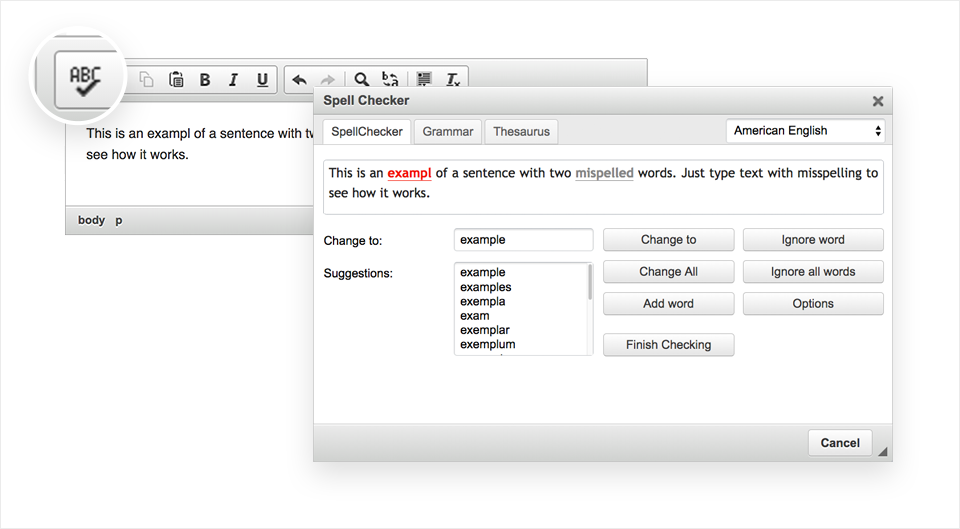
|
||||
|
||||
Installation
|
||||
This plugin brings the multi-language WSC Dialog functionality into CKEditor 4. It is integrated by default starting with [Standard Package of CKEditor 4](https://ckeditor.com/ckeditor-4/download/). You can find it on the CKEditor 4 toolbar panel under the ABC button (Check Spelling).
|
||||
|
||||
If your version of CKEditor doesn’t have WSC Dialog built-in, you can easily add it by following the steps outlined in the Get Started section.
|
||||
|
||||
The default version of WSC Dialog plugin for CKEditor 4 is using the free services of WebSpellChecker. It is provided with a banner ad and has some [limitations](https://docs.webspellchecker.net/display/WebSpellCheckerCloud/Free+and+Paid+WebSpellChecker+Cloud+Services+Comparison+for+CKEditor).
|
||||
|
||||
To lift the limitations and get rid of the banner, [obtain a license](https://webspellchecker.com/wsc-dialog-ckeditor4/#pricing). Depending on your needs, you can choose a Cloud-based or Server (self-hosted) solution.
|
||||
|
||||
Demo
|
||||
------------
|
||||
WSC Dialog plugin for CKEditor 4: https://webspellchecker.com/wsc-dialog-ckeditor4/
|
||||
|
||||
Supported Languages
|
||||
------------
|
||||
|
||||
The WSC Dialog plugin for CKEditor as a part of the free services supports the next languages for check spelling: American English, British English, Canadian English, Canadian French, Danish, Dutch, Finnish, French, German, Greek, Italian, Norwegian Bokmal, Spanish, Swedish.
|
||||
|
||||
There are also additional languages and specialized dictionaries available for a commercial license, you can check the full list [here](https://webspellchecker.com/additional-dictionaries/).
|
||||
|
||||
Get Started
|
||||
------------
|
||||
|
||||
1. Clone/copy this repository contents in a new "plugins/wsc" folder in your CKEditor installation.
|
||||
@@ -13,13 +32,49 @@ Installation
|
||||
|
||||
config.extraPlugins = 'wsc';
|
||||
|
||||
That's all. WSC will appear on the editor toolbar and will be ready to use.
|
||||
That's all. WSC Dialog will appear on the editor toolbar under the ABC button and will be ready to use.
|
||||
|
||||
Supported Browsers
|
||||
-------
|
||||
|
||||
This is the list of officially supported browsers for the WSC Dialog plugin for CKEditor 4. WSC Dialog may also work in other browsers and environments but we unable to check all of them and guarantee proper work.
|
||||
|
||||
* Chrome (the latest)
|
||||
* Firefox (the latest)
|
||||
* Safari (the latest)
|
||||
* MS Edge (the latest)
|
||||
* Internet Explorer 8.0 (limited support)
|
||||
* Internet Explorer 9.0+ (close to full support)
|
||||
|
||||
Note: All browsers are to be supported for web pages that work in Standards Mode.
|
||||
|
||||
Resources
|
||||
-------
|
||||
|
||||
* Demo: https://webspellchecker.com/wsc-dialog-ckeditor4/
|
||||
* Documentation: https://docs.webspellchecker.net/
|
||||
* YouTube video: https://youtu.be/bkVPZ-5T22Q
|
||||
* Term of Service: https://webspellchecker.com/terms-of-service/
|
||||
|
||||
Technical Support or Questions
|
||||
-------
|
||||
|
||||
In cooperation with the CKEditor team, during the past 10 years we have simplified the installation and built the extensive amount of documentation devoted to WSC Dialog plugin for CKEditor 4 and less.
|
||||
|
||||
If you are experiencing any difficulties with the setup of the plugin, please check the links provided in the Resources section.
|
||||
|
||||
Holders of an active subscription to the services or a commercial license have access to professional technical assistance directly from the WebSpellChecker team. [Contact us here](https://webspellchecker.com/contact-us/)!
|
||||
|
||||
Reporting Issues
|
||||
-------
|
||||
|
||||
Please use the [WSC Dialog plugin for CKEditor 4 GitHub issue page](https://github.com/WebSpellChecker/ckeditor-plugin-wsc/issues) to report bugs and feature requests. We will do our best to reply at our earliest convenience.
|
||||
|
||||
License
|
||||
-------
|
||||
|
||||
Licensed under the terms of any of the following licenses at your choice: [GPL](http://www.gnu.org/licenses/gpl.html), [LGPL](http://www.gnu.org/licenses/lgpl.html) and [MPL](http://www.mozilla.org/MPL/MPL-1.1.html).
|
||||
This plugin is licensed under the terms of any of the following licenses at your choice: [GPL](http://www.gnu.org/licenses/gpl.html), [LGPL](http://www.gnu.org/licenses/lgpl.html) and [MPL](http://www.mozilla.org/MPL/MPL-1.1.html).
|
||||
|
||||
See LICENSE.md for more information.
|
||||
|
||||
Developed in cooperation with [WebSpellChecker.net](http://www.webspellchecker.net/).
|
||||
Developed by [WebSpellChecker](https://webspellchecker.com/) in cooperation with CKSource.
|
||||
|
||||
@@ -29,9 +29,9 @@ k.split(","),g=0;g<l.length;g+=1)f.addWordToUserDictionary(l[g]);else c.wsc.Data
|
||||
c.wsc.DataStorage.setData("scayt_user_dictionary",l)),d()}else d()},ReplaceText:function(b){delete b.id;a.div_overlay.setEnable();a.dataTemp=b.text;a.selectingLang=b.currentLang;(b.cmd="0"!==b.len&&b.len)?a.div_overlay.setDisable():window.setTimeout(function(){try{a.div_overlay.setDisable()}catch(b){}},500);K(a.LocalizationButton);L(a.LocalizationLabel)},options_checkbox_send:function(b){delete b.id;b={osp:g.cookie.get("osp"),udn:g.cookie.get("udn"),cust_dic_ids:a.cust_dic_ids};g.postMessage.send({message:b,
|
||||
target:a.targetFromFrame[a.iframeNumber+"_"+a.dialog._.currentTabId],id:"options_outer__page"})},getOptions:function(b){var d=b.DefOptions.udn;a.LocalizationComing=b.DefOptions.localizationButtonsAndText;a.show_grammar=b.show_grammar;a.langList=b.lang;a.bnr=b.bannerId;a.sessionid=b.sessionid;if(b.bannerId){a.setHeightBannerFrame();var c=b.banner;a.dialog.getContentElement(a.dialog._.currentTabId,"banner").getElement().setHtml(c)}else a.setHeightFrame();"undefined"==d&&(a.userDictionaryName?(d=a.userDictionaryName,
|
||||
c={osp:g.cookie.get("osp"),udn:a.userDictionaryName,cust_dic_ids:a.cust_dic_ids,id:"options_dic_send",udnCmd:"create"},g.postMessage.send({message:c,target:a.targetFromFrame[void 0]})):d="");g.cookie.set("osp",b.DefOptions.osp);g.cookie.set("udn",d);g.cookie.set("cust_dic_ids",b.DefOptions.cust_dic_ids);g.postMessage.send({id:"giveOptions"})},options_dic_send:function(b){b={osp:g.cookie.get("osp"),udn:g.cookie.get("udn"),cust_dic_ids:a.cust_dic_ids,id:"options_dic_send",udnCmd:g.cookie.get("udnCmd")};
|
||||
g.postMessage.send({message:b,target:a.targetFromFrame[a.iframeNumber+"_"+a.dialog._.currentTabId]})},data:function(a){delete a.id},giveOptions:function(){},setOptionsConfirmF:function(){},setOptionsConfirmT:function(){t.setValue("")},clickBusy:function(){a.div_overlay.setEnable()},suggestAllCame:function(){a.div_overlay.setDisable();a.div_overlay_no_check.setDisable()},TextCorrect:function(){w(a.langList)}},H=function(a){a=a||window.event;if((a=window.JSON.parse(a.data))&&a.id)P[a.id](a)},F=function(b,
|
||||
d,c,e){d=d||CKEDITOR.config.wsc_cmd;c=c||a.dataTemp;g.postMessage.send({message:{customerId:a.wsc_customerId,text:c,txt_ctrl:a.TextAreaNumber,cmd:d,cust_dic_ids:a.cust_dic_ids,udn:a.userDictionaryName,slang:a.selectingLang,interfaceLang:a.interfaceLang,reset_suggest:e||!1,sessionid:a.sessionid},target:b,id:"data_outer__page"});a.div_overlay.setEnable()},v={superset:{onShow:function(){a.dialog.showPage("Thesaurus");a.dialog.showPage("GrammTab");q()},allowedTabCommands:{spell:!0,grammar:!0,thes:!0},
|
||||
defaultTabCommand:"spell"},usual:{onShow:function(){y();u();q()},allowedTabCommands:{spell:!0},defaultTabCommand:"spell"},rtl:{onShow:function(){y();u();q()},allowedTabCommands:{spell:!0},defaultTabCommand:"spell"},spellgrammar:{onShow:function(){y();a.dialog.showPage("GrammTab");q()},allowedTabCommands:{spell:!0,grammar:!0},defaultTabCommand:"spell"},spellthes:{onShow:function(){a.dialog.showPage("Thesaurus");u();q()},allowedTabCommands:{spell:!0,thes:!0},defaultTabCommand:"spell"}},I=function(b){var d=
|
||||
g.postMessage.send({message:b,target:a.targetFromFrame[a.iframeNumber+"_"+a.dialog._.currentTabId]})},data:function(a){delete a.id},giveOptions:function(){},setOptionsConfirmF:function(){},setOptionsConfirmT:function(){t.setValue("")},clickBusy:function(){a.div_overlay.setEnable()},suggestAllCame:function(){a.div_overlay.setDisable();a.div_overlay_no_check.setDisable()},TextCorrect:function(){w(a.langList)}},H=function(a){a=a||window.event;var d;try{d=window.JSON.parse(a.data)}catch(c){}if(d&&d.id)P[d.id](d)},
|
||||
F=function(b,d,c,e){d=d||CKEDITOR.config.wsc_cmd;c=c||a.dataTemp;g.postMessage.send({message:{customerId:a.wsc_customerId,text:c,txt_ctrl:a.TextAreaNumber,cmd:d,cust_dic_ids:a.cust_dic_ids,udn:a.userDictionaryName,slang:a.selectingLang,interfaceLang:a.interfaceLang,reset_suggest:e||!1,sessionid:a.sessionid},target:b,id:"data_outer__page"});a.div_overlay.setEnable()},v={superset:{onShow:function(){a.dialog.showPage("Thesaurus");a.dialog.showPage("GrammTab");q()},allowedTabCommands:{spell:!0,grammar:!0,
|
||||
thes:!0},defaultTabCommand:"spell"},usual:{onShow:function(){y();u();q()},allowedTabCommands:{spell:!0},defaultTabCommand:"spell"},rtl:{onShow:function(){y();u();q()},allowedTabCommands:{spell:!0},defaultTabCommand:"spell"},spellgrammar:{onShow:function(){y();a.dialog.showPage("GrammTab");q()},allowedTabCommands:{spell:!0,grammar:!0},defaultTabCommand:"spell"},spellthes:{onShow:function(){a.dialog.showPage("Thesaurus");u();q()},allowedTabCommands:{spell:!0,thes:!0},defaultTabCommand:"spell"}},I=function(b){var d=
|
||||
(new function(a){var b={};return{getCmdByTab:function(d){for(var h in a)b[a[h]]=h;return b[d]}}}(a.cmd)).getCmdByTab(CKEDITOR.config.wsc_cmd);p();b.selectPage(d);a.sendData(b)},y=function(){a.dialog.hidePage("Thesaurus")},u=function(){a.dialog.hidePage("GrammTab")},q=function(){a.dialog.showPage("SpellTab")},p=function(){var b=a.dialog.getContentElement(a.dialog._.currentTabId,"bottomGroup").getElement();b.removeStyle("display");b.removeStyle("position");b.removeStyle("left");b.show()},O=function(){var b=
|
||||
a.dialog.getContentElement(a.dialog._.currentTabId,"bottomGroup").getElement(),d=document.activeElement,c;b.setStyles({display:"block",position:"absolute",left:"-9999px"});setTimeout(function(){b.removeStyle("display");b.removeStyle("position");b.removeStyle("left");b.hide();a.dialog._.editor.focusManager.currentActive.focusNext();c=g.misc.findFocusable(a.dialog.parts.contents);if(g.misc.hasClass(d,"cke_dialog_tab")||g.misc.hasClass(d,"cke_dialog_contents_body")||!g.misc.isVisible(d))for(var e=0,
|
||||
f;e<c.count();e++){if(f=c.getItem(e),g.misc.isVisible(f.$)){try{f.$.focus()}catch(h){}break}}else try{d.focus()}catch(k){}},0)},D=function(){var b=a.dialog.getContentElement(a.dialog._.currentTabId,"BlockFinishChecking").getElement(),d=document.activeElement,c;b.setStyles({display:"block",position:"absolute",left:"-9999px"});setTimeout(function(){b.removeStyle("display");b.removeStyle("position");b.removeStyle("left");b.hide();a.dialog._.editor.focusManager.currentActive.focusNext();c=g.misc.findFocusable(a.dialog.parts.contents);
|
||||
|
||||
File diff suppressed because one or more lines are too long
File diff suppressed because one or more lines are too long
File diff suppressed because one or more lines are too long
File diff suppressed because one or more lines are too long
File diff suppressed because one or more lines are too long
@@ -0,0 +1,601 @@
|
||||
/**
|
||||
* TableDnD plug-in for JQuery, allows you to drag and drop table rows
|
||||
* You can set up various options to control how the system will work
|
||||
* Copyright (c) Denis Howlett <denish@isocra.com>
|
||||
* License: MIT.
|
||||
* See https://github.com/isocra/TableDnD
|
||||
*/
|
||||
|
||||
/*jshint -W054 */
|
||||
|
||||
!function ($, window, document, undefined) {
|
||||
|
||||
var startEvent = 'touchstart mousedown',
|
||||
moveEvent = 'touchmove mousemove',
|
||||
endEvent = 'touchend mouseup';
|
||||
|
||||
$(document).ready(function () {
|
||||
function parseStyle(css) {
|
||||
var objMap = {},
|
||||
parts = css.match(/([^;:]+)/g) || [];
|
||||
while (parts.length)
|
||||
objMap[parts.shift()] = parts.shift().trim();
|
||||
|
||||
return objMap;
|
||||
}
|
||||
$('table').each(function () {
|
||||
if ($(this).data('table') === 'dnd') {
|
||||
|
||||
$(this).tableDnD({
|
||||
onDragStyle: $(this).data('ondragstyle') && parseStyle($(this).data('ondragstyle')) || null,
|
||||
onDropStyle: $(this).data('ondropstyle') && parseStyle($(this).data('ondropstyle')) || null,
|
||||
onDragClass: $(this).data('ondragclass') === undefined && "tDnD_whileDrag" || $(this).data('ondragclass'),
|
||||
onDrop: $(this).data('ondrop') && new Function('table', 'row', $(this).data('ondrop')), // 'return eval("'+$(this).data('ondrop')+'");') || null,
|
||||
onDragStart: $(this).data('ondragstart') && new Function('table', 'row' ,$(this).data('ondragstart')), // 'return eval("'+$(this).data('ondragstart')+'");') || null,
|
||||
onDragStop: $(this).data('ondragstop') && new Function('table', 'row' ,$(this).data('ondragstop')),
|
||||
scrollAmount: $(this).data('scrollamount') || 5,
|
||||
sensitivity: $(this).data('sensitivity') || 10,
|
||||
hierarchyLevel: $(this).data('hierarchylevel') || 0,
|
||||
indentArtifact: $(this).data('indentartifact') || '<div class="indent"> </div>',
|
||||
autoWidthAdjust: $(this).data('autowidthadjust') || true,
|
||||
autoCleanRelations: $(this).data('autocleanrelations') || true,
|
||||
jsonPretifySeparator: $(this).data('jsonpretifyseparator') || '\t',
|
||||
serializeRegexp: $(this).data('serializeregexp') && new RegExp($(this).data('serializeregexp')) || /[^\-]*$/,
|
||||
serializeParamName: $(this).data('serializeparamname') || false,
|
||||
dragHandle: $(this).data('draghandle') || null
|
||||
});
|
||||
}
|
||||
|
||||
|
||||
});
|
||||
});
|
||||
|
||||
jQuery.tableDnD = {
|
||||
/** Keep hold of the current table being dragged */
|
||||
currentTable: null,
|
||||
/** Keep hold of the current drag object if any */
|
||||
dragObject: null,
|
||||
/** The current mouse offset */
|
||||
mouseOffset: null,
|
||||
/** Remember the old value of X and Y so that we don't do too much processing */
|
||||
oldX: 0,
|
||||
oldY: 0,
|
||||
|
||||
/** Actually build the structure */
|
||||
build: function(options) {
|
||||
// Set up the defaults if any
|
||||
|
||||
this.each(function() {
|
||||
// This is bound to each matching table, set up the defaults and override with user options
|
||||
this.tableDnDConfig = $.extend({
|
||||
onDragStyle: null,
|
||||
onDropStyle: null,
|
||||
// Add in the default class for whileDragging
|
||||
onDragClass: "tDnD_whileDrag",
|
||||
onDrop: null,
|
||||
onDragStart: null,
|
||||
onDragStop: null,
|
||||
scrollAmount: 5,
|
||||
/** Sensitivity setting will throttle the trigger rate for movement detection */
|
||||
sensitivity: 10,
|
||||
/** Hierarchy level to support parent child. 0 switches this functionality off */
|
||||
hierarchyLevel: 0,
|
||||
/** The html artifact to prepend the first cell with as indentation */
|
||||
indentArtifact: '<div class="indent"> </div>',
|
||||
/** Automatically adjust width of first cell */
|
||||
autoWidthAdjust: true,
|
||||
/** Automatic clean-up to ensure relationship integrity */
|
||||
autoCleanRelations: true,
|
||||
/** Specify a number (4) as number of spaces or any indent string for JSON.stringify */
|
||||
jsonPretifySeparator: '\t',
|
||||
/** The regular expression to use to trim row IDs */
|
||||
serializeRegexp: /[^\-]*$/,
|
||||
/** If you want to specify another parameter name instead of the table ID */
|
||||
serializeParamName: false,
|
||||
/** If you give the name of a class here, then only Cells with this class will be draggable */
|
||||
dragHandle: null
|
||||
}, options || {});
|
||||
|
||||
// Now make the rows draggable
|
||||
$.tableDnD.makeDraggable(this);
|
||||
// Prepare hierarchy support
|
||||
this.tableDnDConfig.hierarchyLevel
|
||||
&& $.tableDnD.makeIndented(this);
|
||||
});
|
||||
|
||||
// Don't break the chain
|
||||
return this;
|
||||
},
|
||||
makeIndented: function (table) {
|
||||
var config = table.tableDnDConfig,
|
||||
rows = table.rows,
|
||||
firstCell = $(rows).first().find('td:first')[0],
|
||||
indentLevel = 0,
|
||||
cellWidth = 0,
|
||||
longestCell,
|
||||
tableStyle;
|
||||
|
||||
if ($(table).hasClass('indtd'))
|
||||
return null;
|
||||
|
||||
tableStyle = $(table).addClass('indtd').attr('style');
|
||||
$(table).css({whiteSpace: "nowrap"});
|
||||
|
||||
for (var w = 0; w < rows.length; w++) {
|
||||
if (cellWidth < $(rows[w]).find('td:first').text().length) {
|
||||
cellWidth = $(rows[w]).find('td:first').text().length;
|
||||
longestCell = w;
|
||||
}
|
||||
}
|
||||
$(firstCell).css({width: 'auto'});
|
||||
for (w = 0; w < config.hierarchyLevel; w++)
|
||||
$(rows[longestCell]).find('td:first').prepend(config.indentArtifact);
|
||||
firstCell && $(firstCell).css({width: firstCell.offsetWidth});
|
||||
tableStyle && $(table).css(tableStyle);
|
||||
|
||||
for (w = 0; w < config.hierarchyLevel; w++)
|
||||
$(rows[longestCell]).find('td:first').children(':first').remove();
|
||||
|
||||
config.hierarchyLevel
|
||||
&& $(rows).each(function () {
|
||||
indentLevel = $(this).data('level') || 0;
|
||||
indentLevel <= config.hierarchyLevel
|
||||
&& $(this).data('level', indentLevel)
|
||||
|| $(this).data('level', 0);
|
||||
for (var i = 0; i < $(this).data('level'); i++)
|
||||
$(this).find('td:first').prepend(config.indentArtifact);
|
||||
});
|
||||
|
||||
return this;
|
||||
},
|
||||
/** This function makes all the rows on the table draggable apart from those marked as "NoDrag" */
|
||||
makeDraggable: function(table) {
|
||||
var config = table.tableDnDConfig;
|
||||
|
||||
config.dragHandle
|
||||
// We only need to add the event to the specified cells
|
||||
&& $(config.dragHandle, table).each(function() {
|
||||
// The cell is bound to "this"
|
||||
$(this).bind(startEvent, function(e) {
|
||||
$.tableDnD.initialiseDrag($(this).parents('tr')[0], table, this, e, config);
|
||||
return false;
|
||||
});
|
||||
})
|
||||
// For backwards compatibility, we add the event to the whole row
|
||||
// get all the rows as a wrapped set
|
||||
|| $(table.rows).each(function() {
|
||||
// Iterate through each row, the row is bound to "this"
|
||||
if (! $(this).hasClass("nodrag")) {
|
||||
$(this).bind(startEvent, function(e) {
|
||||
if (e.target.tagName === "TD") {
|
||||
$.tableDnD.initialiseDrag(this, table, this, e, config);
|
||||
return false;
|
||||
}
|
||||
}).css("cursor", "move"); // Store the tableDnD object
|
||||
} else {
|
||||
$(this).css("cursor", ""); // Remove the cursor if we don't have the nodrag class
|
||||
}
|
||||
});
|
||||
},
|
||||
currentOrder: function() {
|
||||
var rows = this.currentTable.rows;
|
||||
return $.map(rows, function (val) {
|
||||
return ($(val).data('level') + val.id).replace(/\s/g, '');
|
||||
}).join('');
|
||||
},
|
||||
initialiseDrag: function(dragObject, table, target, e, config) {
|
||||
this.dragObject = dragObject;
|
||||
this.currentTable = table;
|
||||
this.mouseOffset = this.getMouseOffset(target, e);
|
||||
this.originalOrder = this.currentOrder();
|
||||
|
||||
// Now we need to capture the mouse up and mouse move event
|
||||
// We can use bind so that we don't interfere with other event handlers
|
||||
$(document)
|
||||
.bind(moveEvent, this.mousemove)
|
||||
.bind(endEvent, this.mouseup);
|
||||
|
||||
// Call the onDragStart method if there is one
|
||||
config.onDragStart
|
||||
&& config.onDragStart(table, target);
|
||||
},
|
||||
updateTables: function() {
|
||||
this.each(function() {
|
||||
// this is now bound to each matching table
|
||||
if (this.tableDnDConfig)
|
||||
$.tableDnD.makeDraggable(this);
|
||||
});
|
||||
},
|
||||
/** Get the mouse coordinates from the event (allowing for browser differences) */
|
||||
mouseCoords: function(e) {
|
||||
if (e.originalEvent.changedTouches)
|
||||
return {
|
||||
x: e.originalEvent.changedTouches[0].clientX,
|
||||
y: e.originalEvent.changedTouches[0].clientY
|
||||
};
|
||||
|
||||
if(e.pageX || e.pageY)
|
||||
return {
|
||||
x: e.pageX,
|
||||
y: e.pageY
|
||||
};
|
||||
|
||||
return {
|
||||
x: e.clientX + document.body.scrollLeft - document.body.clientLeft,
|
||||
y: e.clientY + document.body.scrollTop - document.body.clientTop
|
||||
};
|
||||
},
|
||||
/** Given a target element and a mouse eent, get the mouse offset from that element.
|
||||
To do this we need the element's position and the mouse position */
|
||||
getMouseOffset: function(target, e) {
|
||||
var mousePos,
|
||||
docPos;
|
||||
|
||||
e = e || window.event;
|
||||
|
||||
docPos = this.getPosition(target);
|
||||
mousePos = this.mouseCoords(e);
|
||||
|
||||
return {
|
||||
x: mousePos.x - docPos.x,
|
||||
y: mousePos.y - docPos.y
|
||||
};
|
||||
},
|
||||
/** Get the position of an element by going up the DOM tree and adding up all the offsets */
|
||||
getPosition: function(element) {
|
||||
var left = 0,
|
||||
top = 0;
|
||||
|
||||
// Safari fix -- thanks to Luis Chato for this!
|
||||
// Safari 2 doesn't correctly grab the offsetTop of a table row
|
||||
// this is detailed here:
|
||||
// http://jacob.peargrove.com/blog/2006/technical/table-row-offsettop-bug-in-safari/
|
||||
// the solution is likewise noted there, grab the offset of a table cell in the row - the firstChild.
|
||||
// note that firefox will return a text node as a first child, so designing a more thorough
|
||||
// solution may need to take that into account, for now this seems to work in firefox, safari, ie
|
||||
if (element.offsetHeight === 0)
|
||||
element = element.firstChild; // a table cell
|
||||
|
||||
while (element.offsetParent) {
|
||||
left += element.offsetLeft;
|
||||
top += element.offsetTop;
|
||||
element = element.offsetParent;
|
||||
}
|
||||
|
||||
left += element.offsetLeft;
|
||||
top += element.offsetTop;
|
||||
|
||||
return {
|
||||
x: left,
|
||||
y: top
|
||||
};
|
||||
},
|
||||
autoScroll: function (mousePos) {
|
||||
var config = this.currentTable.tableDnDConfig,
|
||||
yOffset = window.pageYOffset,
|
||||
windowHeight = window.innerHeight
|
||||
? window.innerHeight
|
||||
: document.documentElement.clientHeight
|
||||
? document.documentElement.clientHeight
|
||||
: document.body.clientHeight;
|
||||
|
||||
// Windows version
|
||||
// yOffset=document.body.scrollTop;
|
||||
if (document.all)
|
||||
if (typeof document.compatMode !== 'undefined'
|
||||
&& document.compatMode !== 'BackCompat')
|
||||
yOffset = document.documentElement.scrollTop;
|
||||
else if (typeof document.body !== 'undefined')
|
||||
yOffset = document.body.scrollTop;
|
||||
|
||||
mousePos.y - yOffset < config.scrollAmount
|
||||
&& window.scrollBy(0, - config.scrollAmount)
|
||||
|| windowHeight - (mousePos.y - yOffset) < config.scrollAmount
|
||||
&& window.scrollBy(0, config.scrollAmount);
|
||||
|
||||
},
|
||||
moveVerticle: function (moving, currentRow) {
|
||||
|
||||
if (0 !== moving.vertical
|
||||
// If we're over a row then move the dragged row to there so that the user sees the
|
||||
// effect dynamically
|
||||
&& currentRow
|
||||
&& this.dragObject !== currentRow
|
||||
&& this.dragObject.parentNode === currentRow.parentNode)
|
||||
0 > moving.vertical
|
||||
&& this.dragObject.parentNode.insertBefore(this.dragObject, currentRow.nextSibling)
|
||||
|| 0 < moving.vertical
|
||||
&& this.dragObject.parentNode.insertBefore(this.dragObject, currentRow);
|
||||
|
||||
},
|
||||
moveHorizontal: function (moving, currentRow) {
|
||||
var config = this.currentTable.tableDnDConfig,
|
||||
currentLevel;
|
||||
|
||||
if (!config.hierarchyLevel
|
||||
|| 0 === moving.horizontal
|
||||
// We only care if moving left or right on the current row
|
||||
|| !currentRow
|
||||
|| this.dragObject !== currentRow)
|
||||
return null;
|
||||
|
||||
currentLevel = $(currentRow).data('level');
|
||||
|
||||
0 < moving.horizontal
|
||||
&& currentLevel > 0
|
||||
&& $(currentRow).find('td:first').children(':first').remove()
|
||||
&& $(currentRow).data('level', --currentLevel);
|
||||
|
||||
0 > moving.horizontal
|
||||
&& currentLevel < config.hierarchyLevel
|
||||
&& $(currentRow).prev().data('level') >= currentLevel
|
||||
&& $(currentRow).children(':first').prepend(config.indentArtifact)
|
||||
&& $(currentRow).data('level', ++currentLevel);
|
||||
|
||||
},
|
||||
mousemove: function(e) {
|
||||
var dragObj = $($.tableDnD.dragObject),
|
||||
config = $.tableDnD.currentTable.tableDnDConfig,
|
||||
currentRow,
|
||||
mousePos,
|
||||
moving,
|
||||
x,
|
||||
y;
|
||||
|
||||
e && e.preventDefault();
|
||||
|
||||
if (!$.tableDnD.dragObject)
|
||||
return false;
|
||||
|
||||
// prevent touch device screen scrolling
|
||||
e.type === 'touchmove'
|
||||
&& event.preventDefault(); // TODO verify this is event and not really e
|
||||
|
||||
// update the style to show we're dragging
|
||||
config.onDragClass
|
||||
&& dragObj.addClass(config.onDragClass)
|
||||
|| dragObj.css(config.onDragStyle);
|
||||
|
||||
mousePos = $.tableDnD.mouseCoords(e);
|
||||
x = mousePos.x - $.tableDnD.mouseOffset.x;
|
||||
y = mousePos.y - $.tableDnD.mouseOffset.y;
|
||||
|
||||
// auto scroll the window
|
||||
$.tableDnD.autoScroll(mousePos);
|
||||
|
||||
currentRow = $.tableDnD.findDropTargetRow(dragObj, y);
|
||||
moving = $.tableDnD.findDragDirection(x, y);
|
||||
|
||||
$.tableDnD.moveVerticle(moving, currentRow);
|
||||
$.tableDnD.moveHorizontal(moving, currentRow);
|
||||
|
||||
return false;
|
||||
},
|
||||
findDragDirection: function (x,y) {
|
||||
var sensitivity = this.currentTable.tableDnDConfig.sensitivity,
|
||||
oldX = this.oldX,
|
||||
oldY = this.oldY,
|
||||
xMin = oldX - sensitivity,
|
||||
xMax = oldX + sensitivity,
|
||||
yMin = oldY - sensitivity,
|
||||
yMax = oldY + sensitivity,
|
||||
moving = {
|
||||
horizontal: x >= xMin && x <= xMax ? 0 : x > oldX ? -1 : 1,
|
||||
vertical : y >= yMin && y <= yMax ? 0 : y > oldY ? -1 : 1
|
||||
};
|
||||
|
||||
// update the old value
|
||||
if (moving.horizontal !== 0)
|
||||
this.oldX = x;
|
||||
if (moving.vertical !== 0)
|
||||
this.oldY = y;
|
||||
|
||||
return moving;
|
||||
},
|
||||
/** We're only worried about the y position really, because we can only move rows up and down */
|
||||
findDropTargetRow: function(draggedRow, y) {
|
||||
var rowHeight = 0,
|
||||
rows = this.currentTable.rows,
|
||||
config = this.currentTable.tableDnDConfig,
|
||||
rowY = 0,
|
||||
row = null;
|
||||
|
||||
for (var i = 0; i < rows.length; i++) {
|
||||
row = rows[i];
|
||||
rowY = this.getPosition(row).y;
|
||||
rowHeight = parseInt(row.offsetHeight) / 2;
|
||||
if (row.offsetHeight === 0) {
|
||||
rowY = this.getPosition(row.firstChild).y;
|
||||
rowHeight = parseInt(row.firstChild.offsetHeight) / 2;
|
||||
}
|
||||
// Because we always have to insert before, we need to offset the height a bit
|
||||
if (y > (rowY - rowHeight) && y < (rowY + rowHeight))
|
||||
// that's the row we're over
|
||||
// If it's the same as the current row, ignore it
|
||||
if (draggedRow.is(row)
|
||||
|| (config.onAllowDrop
|
||||
&& !config.onAllowDrop(draggedRow, row))
|
||||
// If a row has nodrop class, then don't allow dropping (inspired by John Tarr and Famic)
|
||||
|| $(row).hasClass("nodrop"))
|
||||
return null;
|
||||
else
|
||||
return row;
|
||||
}
|
||||
return null;
|
||||
},
|
||||
processMouseup: function() {
|
||||
if (!this.currentTable || !this.dragObject)
|
||||
return null;
|
||||
|
||||
var config = this.currentTable.tableDnDConfig,
|
||||
droppedRow = this.dragObject,
|
||||
parentLevel = 0,
|
||||
myLevel = 0;
|
||||
|
||||
// Unbind the event handlers
|
||||
$(document)
|
||||
.unbind(moveEvent, this.mousemove)
|
||||
.unbind(endEvent, this.mouseup);
|
||||
|
||||
config.hierarchyLevel
|
||||
&& config.autoCleanRelations
|
||||
&& $(this.currentTable.rows).first().find('td:first').children().each(function () {
|
||||
myLevel = $(this).parents('tr:first').data('level');
|
||||
myLevel
|
||||
&& $(this).parents('tr:first').data('level', --myLevel)
|
||||
&& $(this).remove();
|
||||
})
|
||||
&& config.hierarchyLevel > 1
|
||||
&& $(this.currentTable.rows).each(function () {
|
||||
myLevel = $(this).data('level');
|
||||
if (myLevel > 1) {
|
||||
parentLevel = $(this).prev().data('level');
|
||||
while (myLevel > parentLevel + 1) {
|
||||
$(this).find('td:first').children(':first').remove();
|
||||
$(this).data('level', --myLevel);
|
||||
}
|
||||
}
|
||||
});
|
||||
|
||||
// If we have a dragObject, then we need to release it,
|
||||
// The row will already have been moved to the right place so we just reset stuff
|
||||
config.onDragClass
|
||||
&& $(droppedRow).removeClass(config.onDragClass)
|
||||
|| $(droppedRow).css(config.onDropStyle);
|
||||
|
||||
this.dragObject = null;
|
||||
// Call the onDrop method if there is one
|
||||
config.onDrop
|
||||
&& this.originalOrder !== this.currentOrder()
|
||||
&& $(droppedRow).hide().fadeIn('fast')
|
||||
&& config.onDrop(this.currentTable, droppedRow);
|
||||
|
||||
// Call the onDragStop method if there is one
|
||||
config.onDragStop
|
||||
&& config.onDragStop(this.currentTable, droppedRow);
|
||||
|
||||
this.currentTable = null; // let go of the table too
|
||||
},
|
||||
mouseup: function(e) {
|
||||
e && e.preventDefault();
|
||||
$.tableDnD.processMouseup();
|
||||
return false;
|
||||
},
|
||||
jsonize: function(pretify) {
|
||||
var table = this.currentTable;
|
||||
if (pretify)
|
||||
return JSON.stringify(
|
||||
this.tableData(table),
|
||||
null,
|
||||
table.tableDnDConfig.jsonPretifySeparator
|
||||
);
|
||||
return JSON.stringify(this.tableData(table));
|
||||
},
|
||||
serialize: function() {
|
||||
return $.param(this.tableData(this.currentTable));
|
||||
},
|
||||
serializeTable: function(table) {
|
||||
var result = "";
|
||||
var paramName = table.tableDnDConfig.serializeParamName || table.id;
|
||||
var rows = table.rows;
|
||||
for (var i=0; i<rows.length; i++) {
|
||||
if (result.length > 0) result += "&";
|
||||
var rowId = rows[i].id;
|
||||
if (rowId && table.tableDnDConfig && table.tableDnDConfig.serializeRegexp) {
|
||||
rowId = rowId.match(table.tableDnDConfig.serializeRegexp)[0];
|
||||
result += paramName + '[]=' + rowId;
|
||||
}
|
||||
}
|
||||
return result;
|
||||
},
|
||||
serializeTables: function() {
|
||||
var result = [];
|
||||
$('table').each(function() {
|
||||
this.id && result.push($.param($.tableDnD.tableData(this)));
|
||||
});
|
||||
return result.join('&');
|
||||
},
|
||||
tableData: function (table) {
|
||||
var config = table.tableDnDConfig,
|
||||
previousIDs = [],
|
||||
currentLevel = 0,
|
||||
indentLevel = 0,
|
||||
rowID = null,
|
||||
data = {},
|
||||
getSerializeRegexp,
|
||||
paramName,
|
||||
currentID,
|
||||
rows;
|
||||
|
||||
if (!table)
|
||||
table = this.currentTable;
|
||||
if (!table || !table.rows || !table.rows.length)
|
||||
return {error: { code: 500, message: "Not a valid table."}};
|
||||
if (!table.id && !config.serializeParamName)
|
||||
return {error: { code: 500, message: "No serializable unique id provided."}};
|
||||
|
||||
rows = config.autoCleanRelations
|
||||
&& table.rows
|
||||
|| $.makeArray(table.rows);
|
||||
paramName = config.serializeParamName || table.id;
|
||||
currentID = paramName;
|
||||
|
||||
getSerializeRegexp = function (rowId) {
|
||||
if (rowId && config && config.serializeRegexp)
|
||||
return rowId.match(config.serializeRegexp)[0];
|
||||
return rowId;
|
||||
};
|
||||
|
||||
data[currentID] = [];
|
||||
!config.autoCleanRelations
|
||||
&& $(rows[0]).data('level')
|
||||
&& rows.unshift({id: 'undefined'});
|
||||
|
||||
|
||||
|
||||
for (var i=0; i < rows.length; i++) {
|
||||
if (config.hierarchyLevel) {
|
||||
indentLevel = $(rows[i]).data('level') || 0;
|
||||
if (indentLevel === 0) {
|
||||
currentID = paramName;
|
||||
previousIDs = [];
|
||||
}
|
||||
else if (indentLevel > currentLevel) {
|
||||
previousIDs.push([currentID, currentLevel]);
|
||||
currentID = getSerializeRegexp(rows[i-1].id);
|
||||
}
|
||||
else if (indentLevel < currentLevel) {
|
||||
for (var h = 0; h < previousIDs.length; h++) {
|
||||
if (previousIDs[h][1] === indentLevel)
|
||||
currentID = previousIDs[h][0];
|
||||
if (previousIDs[h][1] >= currentLevel)
|
||||
previousIDs[h][1] = 0;
|
||||
}
|
||||
}
|
||||
currentLevel = indentLevel;
|
||||
|
||||
if (!$.isArray(data[currentID]))
|
||||
data[currentID] = [];
|
||||
rowID = getSerializeRegexp(rows[i].id);
|
||||
rowID && data[currentID].push(rowID);
|
||||
}
|
||||
else {
|
||||
rowID = getSerializeRegexp(rows[i].id);
|
||||
rowID && data[currentID].push(rowID);
|
||||
}
|
||||
}
|
||||
return data;
|
||||
}
|
||||
};
|
||||
|
||||
jQuery.fn.extend(
|
||||
{
|
||||
tableDnD : $.tableDnD.build,
|
||||
tableDnDUpdate : $.tableDnD.updateTables,
|
||||
tableDnDSerialize : $.proxy($.tableDnD.serialize, $.tableDnD),
|
||||
tableDnDSerializeAll : $.tableDnD.serializeTables,
|
||||
tableDnDData : $.proxy($.tableDnD.tableData, $.tableDnD)
|
||||
}
|
||||
);
|
||||
|
||||
}(jQuery, window, window.document);
|
||||
File diff suppressed because one or more lines are too long
Reference in New Issue
Block a user